
Obraz na obraz
Zdjęcie wzorcowe
AI obraz na obraz: nowy kierunek dla Twojego zdjęcia
Zacznij od zdjęcia referencyjnego i opisz, co ma być dalej. Zmień styl, otoczenie albo nastrój dzięki narzędziu PixJelly Obraz na obraz.
Od referencji do świeżej interpretacji
- 1
Dodaj referencję
Prześlij zdjęcie, upuść je w obszarze roboczym albo wklej ze schowka. Przyjmujemy pliki PNG, JPEG i WebP do 25 MB, a zanim cokolwiek zostanie wysłane, obszar roboczy przygotowuje kopię roboczą o dłuższym boku do 1800 pikseli.
- 2
Opisz swój kierunek
Napisz, co zmienić, a co zachować. Wybierz PixJelly V2.0 albo jeden z zewnętrznych modeli obrazu, a potem ustaw kształt wyniku tak, by pasował do kadru, którego naprawdę potrzebujesz.
- 3
Stwórz i zapisz
Zapytanie działa na serwerach dostawcy, a obszar roboczy śledzi zadanie. Obejrzyj nowy obraz obok referencji, a potem pobierz go do kolejnego projektu albo opisz inny kierunek i uruchom ponownie.
Twoja kompozycja, inny nastrój
Użyj zdjęcia jako punktu wyjścia dla nowego kierunku wizualnego. Opisz inny materiał, światło albo styl artystyczny, zachowując elementy, na których Ci zależy. Nazwanie tego, co warto zachować, jest równie ważne jak nazwanie zmiany, bo każdy piksel kadru i tak zostanie narysowany od nowa.
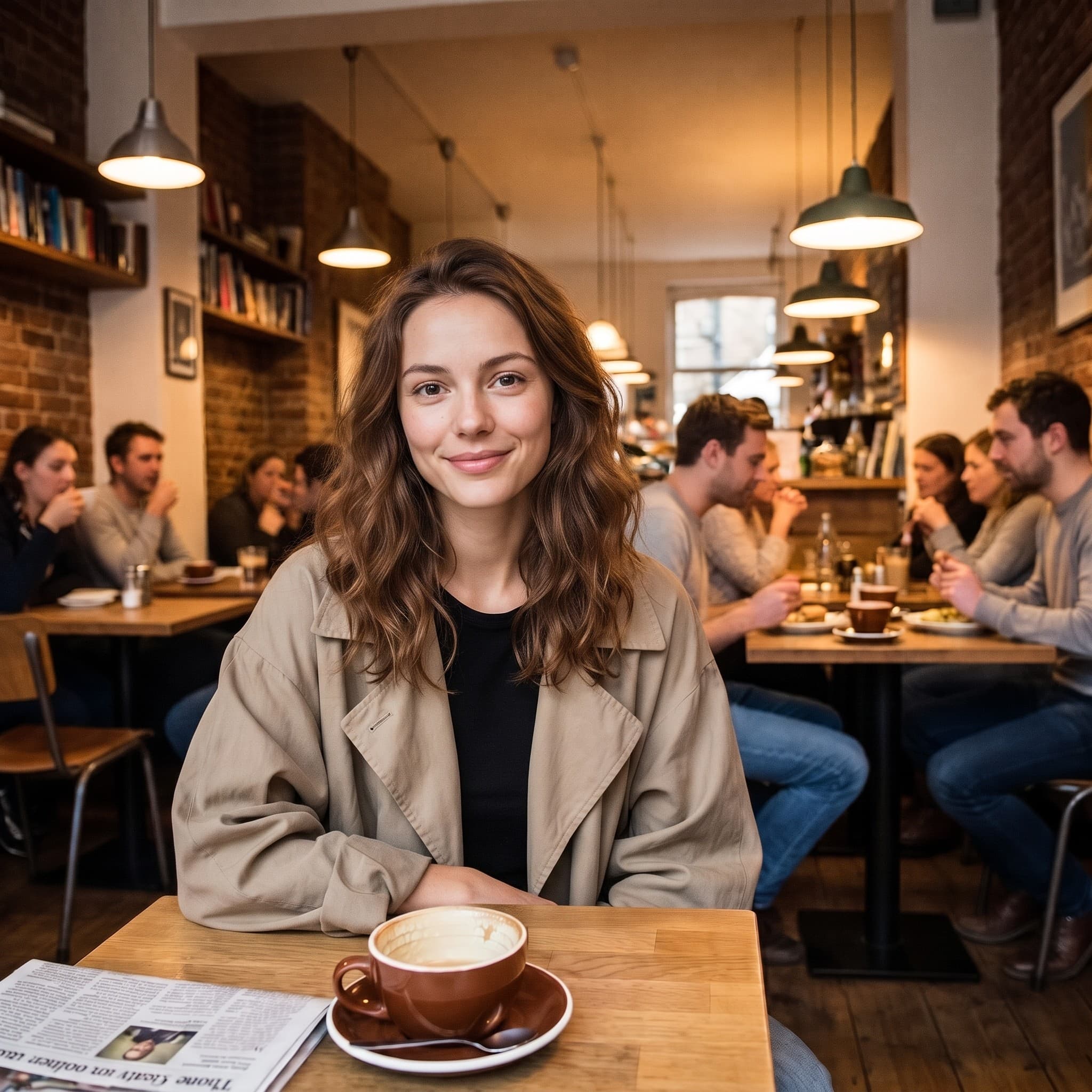
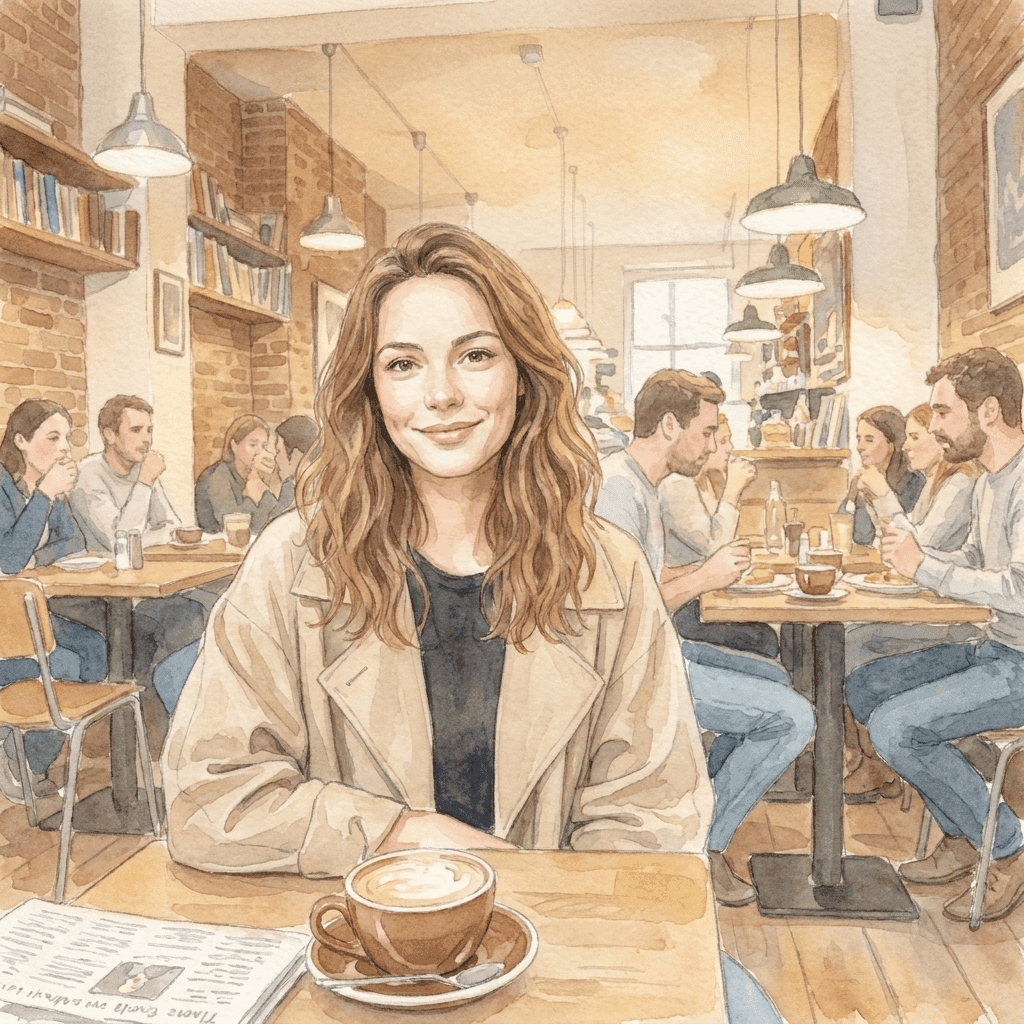
Od zdjęcia do łagodniejszego świata
Ta akwarelowa ilustracja powstała ze zdjęcia referencyjnego dzięki krótkiej instrukcji stylu. Przynieś własny kierunek wizualny i sprawdź, czym może stać się Twój obraz. To poza, kadrowanie i sposób, w jaki pada światło na oryginale, sprawiają, że ilustrację da się rozpoznać; instrukcja musiała dostarczyć tylko technikę.
Skupiony obszar roboczy obraz na obraz
Przynieś referencję. Wybierz kierunek.
Jedna referencja, wiele pomysłów
Szukaj nowego otoczenia, techniki albo stylu wizualnego na podstawie jednego istniejącego obrazu. Twój plik nigdy nie jest nadpisywany, więc możesz uruchomić tę samą referencję z innym kierunkiem, ilekroć pierwsza odpowiedź nie jest tą właściwą.
Wybierz model
Użyj PixJelly V2.0 albo jednego z dostępnych zewnętrznych modeli obrazu. Każdy czyta tę samą referencję i tę samą instrukcję inaczej, więc kierunek, który nie wyszedł na jednym, często warto wypróbować na innym.
Gotowe do pobrania
Zapisz wynik prosto z obszaru roboczego, bez kroku ze znakiem wodnym i bez osobnego ekranu eksportu po drodze.
Formaty dopasowane do kadru
Ustaw wynik na 1:1, 3:4, 4:3, 16:9 albo 9:16. Obraz jest generowany w wybranych proporcjach, a nie przycinany do nich później.
Miejsce na wyjaśnienia
Pole promptu przyjmuje do 5000 znaków, co wystarczy, by za jednym razem opisać zmianę, rzeczy do zachowania i nastrój, o który Ci chodzi.
Nic do instalowania
AI obraz na obraz działa w przeglądarce, którą już masz. Bez wtyczki i bez aplikacji na komputer. Zaloguj się przez Google, aby generować; przy pierwszym logowaniu dostajesz 10 darmowych kredytów.
Co jeszcze jest w obszarze roboczym
Przekształcenie zdjęcia to jedno zadanie. Oto pozostałe.
Tekst na obraz
Nie masz referencji pod ręką? Napisz prompt i wygeneruj obraz z samych słów.
Zaznacz i edytuj
Zostaw zdjęcie takie, jakie jest, i zmień jedną jego część. Narysuj strzałkę do tego miejsca i tam wpisz instrukcję.
Usuń tło
Wytnij motyw jako przezroczysty PNG. To narzędzie działa na Twoim własnym urządzeniu, a nie na serwerze.
Kontynuuj pracę z obrazem
Gdzie sprawdza się AI obraz na obraz
Kierunek kreatywny
- Weź zdjęcie, które już lubisz, i zobacz je jako akwarelę, rysunek tuszem albo malowaną ilustrację.
- Wypróbuj inne oświetlenie całego kadru bez powrotu na sesję.
- Przenieś zestaw niepowiązanych referencji do jednego języka wizualnego, żeby prezentacja czytała się jak jeden pomysł.
Zdjęcia produktowe
- Opisz nowe tło dla zdjęcia produktu, gdy pierwotna sceneria nie pasuje już do kampanii.
- Sprawdź inny nastrój, cieplejszy, chłodniejszy albo bardziej redakcyjny, zanim zarezerwujesz sesję, która uczyni go rzeczywistym.
- Pokaż komuś, jak wyglądałoby dane ujęcie tematu, zamiast opisywać je w akapicie i liczyć, że trafi.
Eksperymenty ze stylem
- Przepuść tę samą referencję przez dwa modele i porównaj, który zrozumiał opisany przez Ciebie kierunek.
- Zmieniaj jeden fragment naraz i patrz, co się przesuwa. To najszybszy sposób, by poznać, czego model naprawdę słucha.
- Zachowaj kompozycję, nad którą już się napracowałeś, a wszystko inne w kadrze traktuj jako zmienną.
Zdjęcia prywatne
- Zamień portret w ilustrację na kartkę, zdjęcie profilowe albo coś, co warto wydrukować.
- Przenieś zdjęcie z wakacji w porę roku, w której nie zostało zrobione.
- Nadaj staremu zdjęciu charakter pasujący do ściany, na której chcesz je powiesić.
Czym jest AI obraz na obraz?
Zdjęcie i pisemny kierunek trafiają do modelu razem. To narzędzie dla każdego, kto ma zdjęcie prawie dobre, ale nie w tym stylu, otoczeniu albo nastroju. O tym, co wraca, decydują cztery rzeczy.
Twoja referencja
Jeden plik PNG, JPEG lub WebP do 25 MB. Obszar roboczy przygotowuje kopię roboczą o dłuższym boku do 1800 pikseli i to ją wysyła do modelu, więc dużo większy plik nic tu nie daje. Referencja niesie za to wszystko, czego akapit nie potrafi dobrze opisać: pozę, odstępy, sposób, w jaki pada światło.
Twój kierunek
Napisz, co ma się zmienić, a co zostać. Nazwanie rzeczy wartych zachowania (pozy, układu, kształtu produktu) zwykle znaczy więcej niż opisywanie tego, co i tak widać w kadrze. Pole promptu mieści do 5000 znaków, więc nie trzeba skracać briefu.
Twój model
PixJelly V2.0 to nasz dopracowany proces, obecnie oparty na Nano Banana Pro. Dostępne są też Nano Banana 2.1, GPT Image 2 i Seedream 5 Pro, a każdy z nich czyta tę samą referencję inaczej. Wypróbowanie jednego briefu na dwóch modelach niewiele kosztuje, a dużo mówi.
Twój wynik
Wynikiem jest nowo wygenerowany obraz w wybranych proporcjach, a nie edycja nałożona na Twój plik. Referencja zostaje nietknięta, a panel wyników mieści jeden obraz naraz, więc pobierz wszystko, co chcesz zachować, przed kolejnym uruchomieniem.
Nowy obraz, a nie retusz
AI obraz na obraz generuje od nowa cały kadr. Wszystko w wyniku narysował model, także fragmenty, które wyglądają na nietknięte, więc napisy, dłonie, logotypy i drobne obiekty w tle mogą wrócić zmienione. Zanim gdziekolwiek użyjesz wyniku, porównaj go z referencją.
Ten kompromis decyduje o wyborze narzędzia. Przekształcenie AI obraz na obraz to dobry ruch, gdy styl, otoczenie i nastrój mają zmienić się razem. Gdy źle wygląda tylko jeden obszar, a reszta zdjęcia jest już w porządku, wskazanie tego obszaru i opisanie zmiany zachowuje znacznie więcej z tego, od czego zacząłeś. Gdy potrzebujesz tylko oddzielić motyw od tła, wycinanie na urządzeniu w ogóle nie rusza oryginalnych pikseli.
Start od obrazu zamiast od zdania opłaca się dokładnie z tego samego powodu, dla którego jest ryzykowny. Referencja przekazuje modelowi informacje, których nie uniesie żaden akapit, ale przekazuje też to, o czym nie myślałeś. Wybierz więc referencję naprawdę bliską kompozycji, której chcesz, i czytaj wynik pod kątem odstępstw, a nie tylko stylu.
Pytania o AI obraz na obraz
Czy potrzebuję obrazu referencyjnego?
Tak. To narzędzie zaczyna od jednego przesłanego obrazu. Jeśli nie masz od czego zacząć, najpierw wygeneruj obraz z pisemnego promptu i wróć z nim tutaj jako z referencją.
Czy wszystkie szczegóły oryginału zostaną takie same?
Nie. Cały kadr jest generowany od nowa, więc tekst, dłonie, logotypy i drobne obiekty w tle mogą wrócić zmienione. Sprawdź wynik przed użyciem, a gdy źle wygląda tylko jeden obszar, rozważ celowaną edycję lokalną.
Czy obraz jest przetwarzany na moim urządzeniu?
Nie. Twoja referencja i prompt trafiają do wybranego dostawcy modelu obrazu, a nowy obraz powstaje na jego serwerach.
Jakiej wielkości powinna być referencja?
Dowolny plik PNG, JPEG lub WebP do 25 MB. Obszar roboczy generuje z kopii o dłuższym boku do 1800 pikseli, więc bardzo duży oryginał nie dodaje wynikowi szczegółów.
Jak szczegółowa powinna być instrukcja?
Konkretna co do zmiany i konkretna co do tego, co ma ją przetrwać. Nazwanie pozy, układu albo kształtu produktu, które chcesz zachować, zwykle przydaje się bardziej niż opisywanie tego, co i tak wyraźnie widać na zdjęciu.
Jakie proporcje będzie miał wynik?
Te, które wybierzesz przed generowaniem: 1:1, 3:4, 4:3, 16:9 albo 9:16. Wynik jest generowany w tym kształcie, a nie do niego przycinany, więc wybierz proporcje pasujące do miejsca, w które trafi obraz.
Czy mój oryginalny plik zostaje zmieniony?
Nie. Wynik to osobny, nowo wygenerowany obraz. Twoja referencja zostaje dokładnie taka, jaką dodałeś, a panel wyników mieści jeden obraz naraz, więc pobierz wszystko, co warto zachować, przed kolejnym uruchomieniem.
Czy potrzebuję konta?
Referencję możesz dodać i kierunek opisać bez konta. Generowanie wymaga logowania przez Google, bo zapytanie działa na serwerach dostawcy modelu obrazu. Przy pierwszym logowaniu dostajesz 10 darmowych kredytów, czyli tyle, ile trzeba na dwa obrazy najtańszym modelem.