
Immagine a immagine
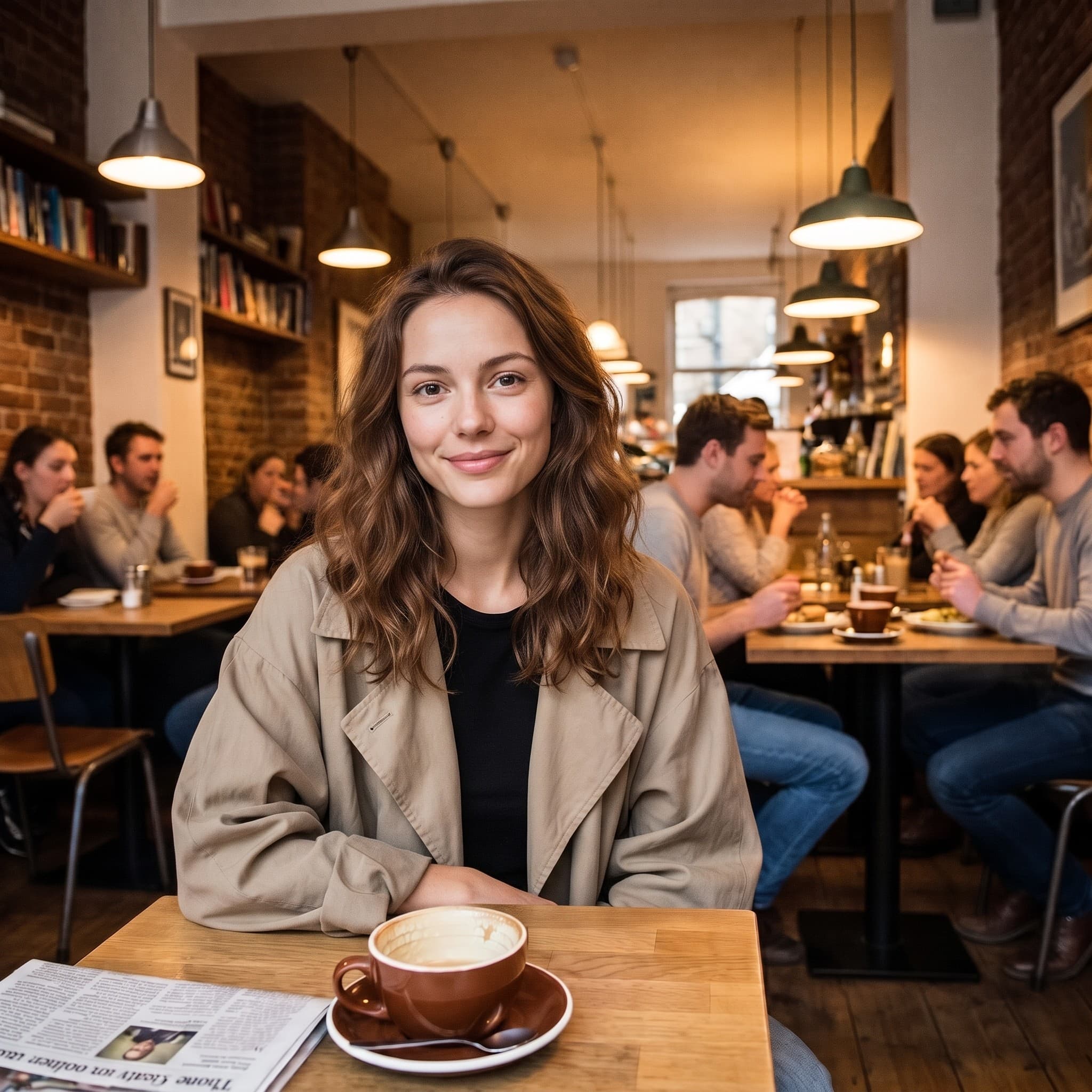
Immagine di riferimento
AI immagine a immagine: una nuova direzione per la sua foto
Parta da una foto di riferimento e descriva cosa viene dopo. Cambi lo stile, l'ambientazione o l'atmosfera con Immagine a immagine di PixJelly.
Dal riferimento a una nuova interpretazione
- 1
Aggiunga un riferimento
Carichi una foto, la trascini nell'area di lavoro o la incolli dagli appunti. Sono accettati file PNG, JPEG e WebP fino a 25 MB, e l'area di lavoro prepara una copia fino a 1.800 pixel sul lato lungo prima di inviare qualsiasi cosa.
- 2
Descriva la sua direzione
Ci dica cosa cambiare e cosa mantenere. Scelga PixJelly V2.0 o uno dei modelli di immagine esterni, poi imposti la forma del risultato sull'inquadratura che le serve davvero.
- 3
Crei e salvi
La richiesta viene elaborata sui server del fornitore mentre l'area di lavoro segue l'attività. Controlli la nuova immagine accanto al riferimento, poi la scarichi per il suo prossimo progetto oppure scriva un'altra direzione e generi di nuovo.
La sua composizione, un'atmosfera diversa
Usi una foto come punto di partenza per una nuova direzione visiva. Descriva un materiale, una luce o uno stile artistico diversi, mantenendo gli elementi che le stanno a cuore. Nominare le parti da tenere conta quanto nominare la modifica, perché ogni pixel dell'inquadratura viene comunque ridisegnato.
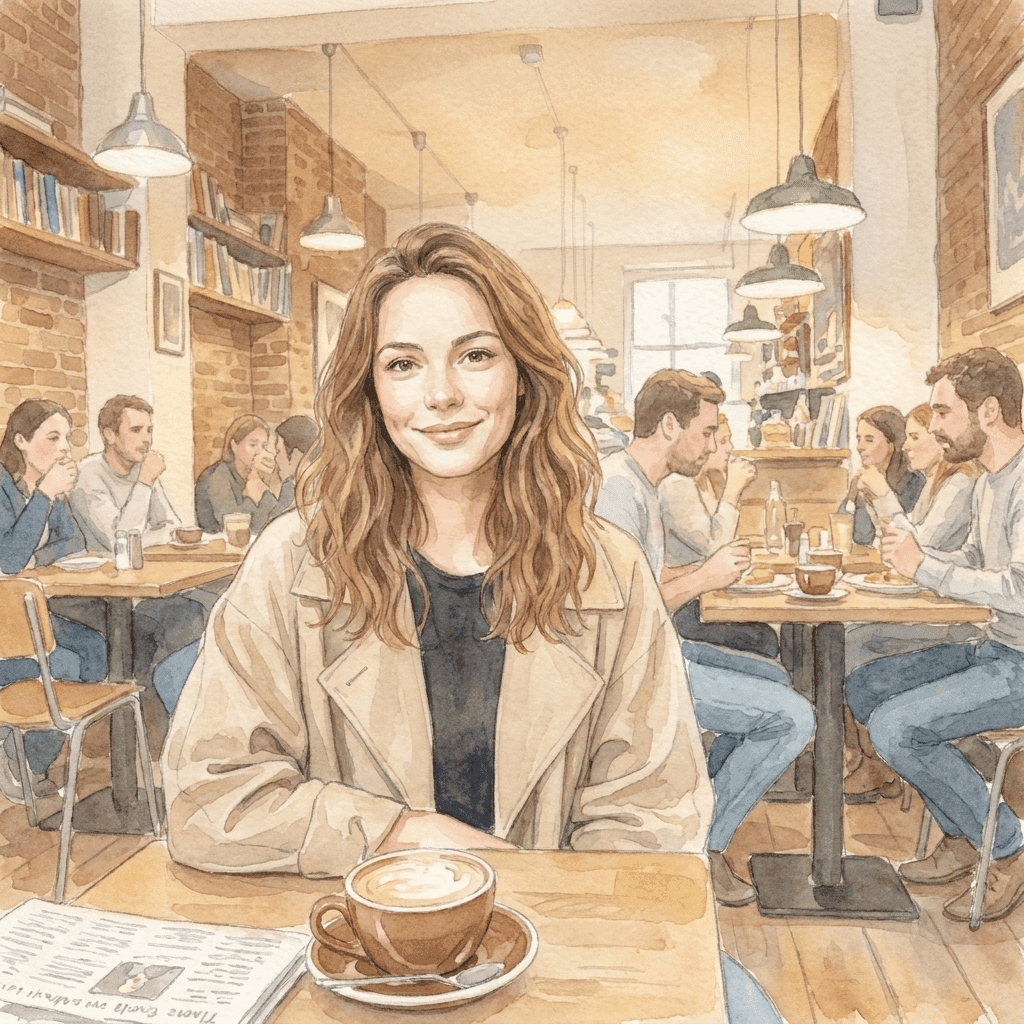
Da una foto a un mondo più morbido
Questa illustrazione ad acquerello è stata generata dalla foto di riferimento con una breve istruzione di stile. Porti una sua direzione visiva e scopra cosa può diventare la sua immagine. La posa, l'inquadratura e il modo in cui cade la luce nell'originale sono ciò che rende riconoscibile l'illustrazione; l'istruzione ha dovuto indicare soltanto la tecnica.
Un'area di lavoro immagine a immagine essenziale
Porti il riferimento. Scelga la direzione.
Un riferimento, tante idee
Esplori una nuova ambientazione, tecnica o stile visivo partendo da una sola immagine esistente. Il suo file non viene mai sovrascritto, quindi può riusare lo stesso riferimento con un'altra direzione quando la prima risposta non è quella giusta.
Scelga il modello
Usi PixJelly V2.0 o uno dei modelli di immagine esterni disponibili. Ognuno legge in modo diverso lo stesso riferimento e la stessa istruzione, quindi una direzione che non funziona su uno spesso vale la pena di provarla su un altro.
Pronta da scaricare
Salvi il risultato direttamente dall'area di lavoro, senza filigrane da togliere e senza schermate di esportazione intermedie.
Formati adatti all'inquadratura
Imposti il risultato su 1:1, 3:4, 4:3, 16:9 o 9:16. L'immagine viene generata nel rapporto scelto, non ritagliata in seguito.
Spazio per spiegarsi
Il campo del prompt accetta fino a 5.000 caratteri, abbastanza per descrivere la modifica, ciò che va preservato e l'atmosfera che cerca, tutto in una volta.
Niente da installare
L'AI immagine a immagine funziona nel browser che già usa. Nessun plugin e nessuna applicazione desktop. Acceda con Google per generare; il primo accesso include 10 crediti gratuiti.
Cos'altro c'è nell'area di lavoro
Trasformare una foto è un lavoro. Questi sono gli altri.
Da testo a immagine
Nessun riferimento a portata di mano? Scriva un prompt e generi un'immagine partendo solo dalle parole.
Annotare e modificare
Lasci la foto com'è e ne cambi solo una parte. Disegni una freccia sul punto e scriva lì l'istruzione.
Rimuovere lo sfondo
Scontorni il soggetto come PNG trasparente. Questo strumento funziona sul suo dispositivo e non su un server.
Continui il suo flusso di lavoro
Dove serve l'AI immagine a immagine
Direzione creativa
- Prenda una fotografia che le piace già e la veda come acquerello, disegno a china o illustrazione dipinta.
- Provi un trattamento di luce diverso su tutta l'inquadratura senza tornare sul set.
- Porti una serie di riferimenti scollegati a un unico linguaggio visivo, così una presentazione si legge come un'idea sola.
Immagini di prodotto
- Descriva un nuovo sfondo per una foto di prodotto quando l'ambientazione originale non è più in linea con la campagna.
- Esplori un'atmosfera diversa, più calda, più fredda o più editoriale, prima di prenotare il servizio fotografico che la renderà reale.
- Mostri a qualcuno come apparirebbe un trattamento invece di descriverlo in un paragrafo sperando che venga capito.
Esplorazione di stili
- Passi lo stesso riferimento su due modelli e confronti quale ha capito la direzione che ha scritto.
- Cambi una parte alla volta e osservi cosa si muove. È il modo più rapido per capire a cosa presta davvero attenzione un modello.
- Tenga la composizione su cui ha già investito tempo e tratti tutto il resto dell'inquadratura come una variabile.
Foto personali
- Trasformi un ritratto in un'illustrazione per un biglietto, un'immagine del profilo o qualcosa che valga la pena stampare.
- Reimmagini una foto delle vacanze in una stagione diversa da quella in cui è stata scattata.
- Dia a una vecchia istantanea un trattamento adatto alla parete su cui vuole appenderla.
Che cos'è l'AI immagine a immagine?
Un'immagine e un'indicazione scritta entrano insieme. È adatta a chiunque abbia una foto quasi giusta, ma sbagliata nello stile, nell'ambientazione o nell'atmosfera. Quattro elementi decidono cosa torna indietro.
Il suo riferimento
Un PNG, JPEG o WebP fino a 25 MB. L'area di lavoro prepara una copia fino a 1.800 pixel sul lato lungo e invia quella copia al modello, quindi un file molto più grande qui non porta alcun vantaggio. Ciò che il riferimento trasmette davvero è tutto quello che un paragrafo fatica a descrivere: la posa, le distanze, il modo in cui cade la luce.
La sua direzione
Scriva cosa deve cambiare e cosa deve restare. Nominare ciò che vale la pena tenere (una posa, un'impaginazione, la forma di un prodotto) di solito conta più che descrivere ciò che è già visibile nell'inquadratura. Il campo del prompt contiene fino a 5.000 caratteri, quindi non serve comprimere la richiesta.
Il suo modello
PixJelly V2.0 è il nostro flusso curato e attualmente funziona con Nano Banana Pro. Sono disponibili anche Nano Banana 2.1, GPT Image 2 e Seedream 5 Pro, e ognuno legge lo stesso riferimento in modo diverso. Provare una richiesta su due modelli costa poco e dice molto.
Il suo risultato
Il risultato è un'immagine generata da capo nel rapporto scelto, non una modifica applicata sopra il suo file. Il riferimento resta intatto, e il pannello dei risultati contiene un'immagine alla volta, quindi scarichi ciò che vuole tenere prima della generazione successiva.
Un'immagine nuova, non un ritocco
L'AI immagine a immagine rigenera l'intera inquadratura. Tutto ciò che compare nel risultato è stato disegnato dal modello, comprese le parti che sembrano intatte, quindi scritte, mani, loghi e piccoli oggetti sullo sfondo possono tornare cambiati. Confronti il risultato con il riferimento prima di usarlo ovunque.
È questo compromesso a decidere quale strumento usare. Una trasformazione immagine a immagine è la scelta giusta quando stile, ambientazione e atmosfera devono cambiare insieme. Quando è sbagliata una sola zona e il resto della fotografia è già corretto, indicare quella zona e descrivere la modifica preserva molto di più di ciò da cui è partito. Quando le serve solo staccare il soggetto dallo sfondo, uno scontorno sul suo dispositivo lascia del tutto intatti i pixel originali.
Partire da un'immagine invece che da una frase vale la pena proprio per lo stesso motivo per cui è rischioso. Il riferimento dà al modello informazioni che nessun paragrafo può trasmettere, e gli consegna anche le parti a cui lei non stava pensando. Scelga quindi un riferimento davvero vicino alla composizione che desidera, e legga il risultato cercando gli scostamenti, non solo lo stile.
Domande sull'AI immagine a immagine
Serve un'immagine di riferimento?
Sì. Questo strumento parte da un'immagine caricata. Se non ha nulla da cui partire, generi prima un'immagine da un prompt scritto e la riporti qui come riferimento.
Ogni dettaglio dell'originale resterà uguale?
No. L'intera inquadratura viene generata di nuovo, quindi testo, mani, loghi e piccoli oggetti sullo sfondo possono tornare cambiati. Controlli il risultato prima di usarlo e, quando è sbagliata una sola zona, valuti piuttosto una modifica locale mirata.
L'elaborazione avviene sul mio dispositivo?
No. Il riferimento e il prompt vengono inviati al fornitore di immagini selezionato, e la nuova immagine viene generata sui suoi server.
Quanto deve essere grande il riferimento?
Qualsiasi PNG, JPEG o WebP fino a 25 MB. L'area di lavoro genera da una copia fino a 1.800 pixel sul lato lungo, quindi un originale molto grande non aggiunge dettagli al risultato.
Quanto deve essere precisa l'istruzione?
Precisa sulla modifica, e precisa su ciò che deve sopravvivere. Nominare una posa, un'impaginazione o la forma di un prodotto da mantenere di solito è più utile che descrivere ciò che si vede già chiaramente nella fotografia.
Quale rapporto d'aspetto avrà il risultato?
Quello che sceglie prima di generare: 1:1, 3:4, 4:3, 16:9 o 9:16. Il risultato viene generato in quella forma, non ritagliato, quindi scelga il rapporto adatto al posto in cui andrà l'immagine.
Il mio file originale viene modificato?
No. Il risultato è un'immagine separata, generata da capo. Il riferimento resta esattamente come l'ha aggiunto, e il pannello dei risultati contiene un'immagine alla volta, quindi scarichi ciò che vale la pena tenere prima di generare di nuovo.
Serve un account?
Può aggiungere un riferimento e scrivere una direzione senza account. Per generare serve l'accesso con Google, perché la richiesta viene elaborata sui server di un fornitore di immagini. Il primo accesso aggiunge 10 crediti gratuiti, sufficienti per due immagini con il modello meno costoso.