
画像から画像
参考画像
画像から画像の AI で、写真に新しい方向性を
参考写真を用意して、次にどうしたいかを書いてください。PixJelly の画像から画像で、スタイル、場面、ムードを変えられます。
参考画像から、新しい解釈へ
- 1
参考画像を読み込む
写真をアップロードするか、ワークスペースにドロップするか、クリップボードから貼り付けます。25 MB までの PNG、JPEG、WebP に対応し、送信する前に、ワークスペースが長辺最大 1,800 ピクセルの作業用コピーを用意します。
- 2
方向性を書く
何を変え、何を残すかを伝えてください。PixJelly V2.0 か外部の画像モデルのどれかを選び、実際に必要なフレームに合わせて出力の形を決めます。
- 3
生成して保存
リクエストはプロバイダーのサーバーで実行され、ワークスペースがタスクを追跡します。新しい画像を参考画像と並べて確認し、次のプロジェクトのためにダウンロードするか、別の方向性を書いてもう一度実行します。
構図はそのままに、ムードを変える
写真を出発点にして、新しいビジュアルの方向性を探れます。大事な要素は残したまま、違う素材、光、画風を言葉で伝えてください。どのみち画面のすべてのピクセルが描き直されるので、変えたい点と同じくらい、残したい部分を言葉にすることが大切です。
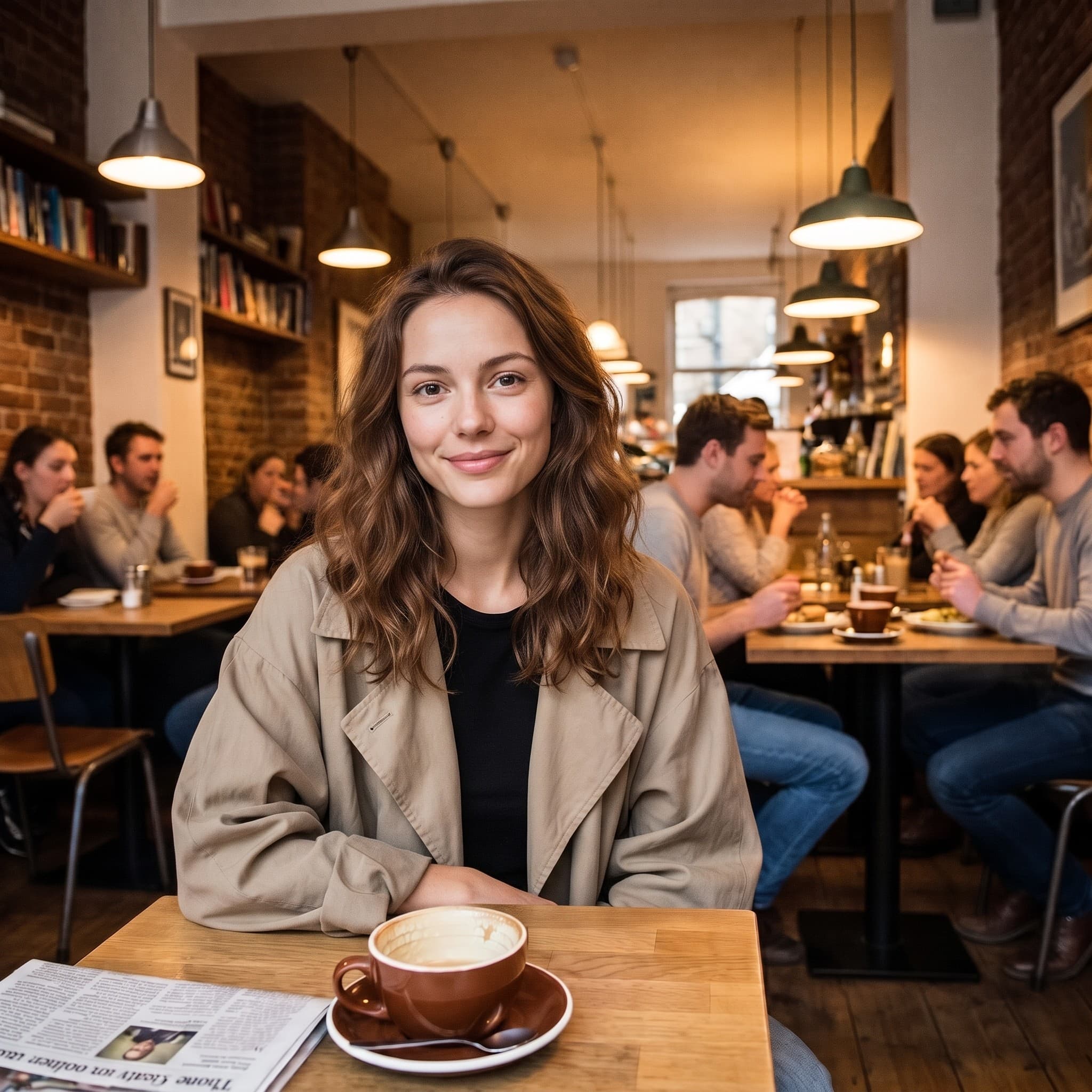
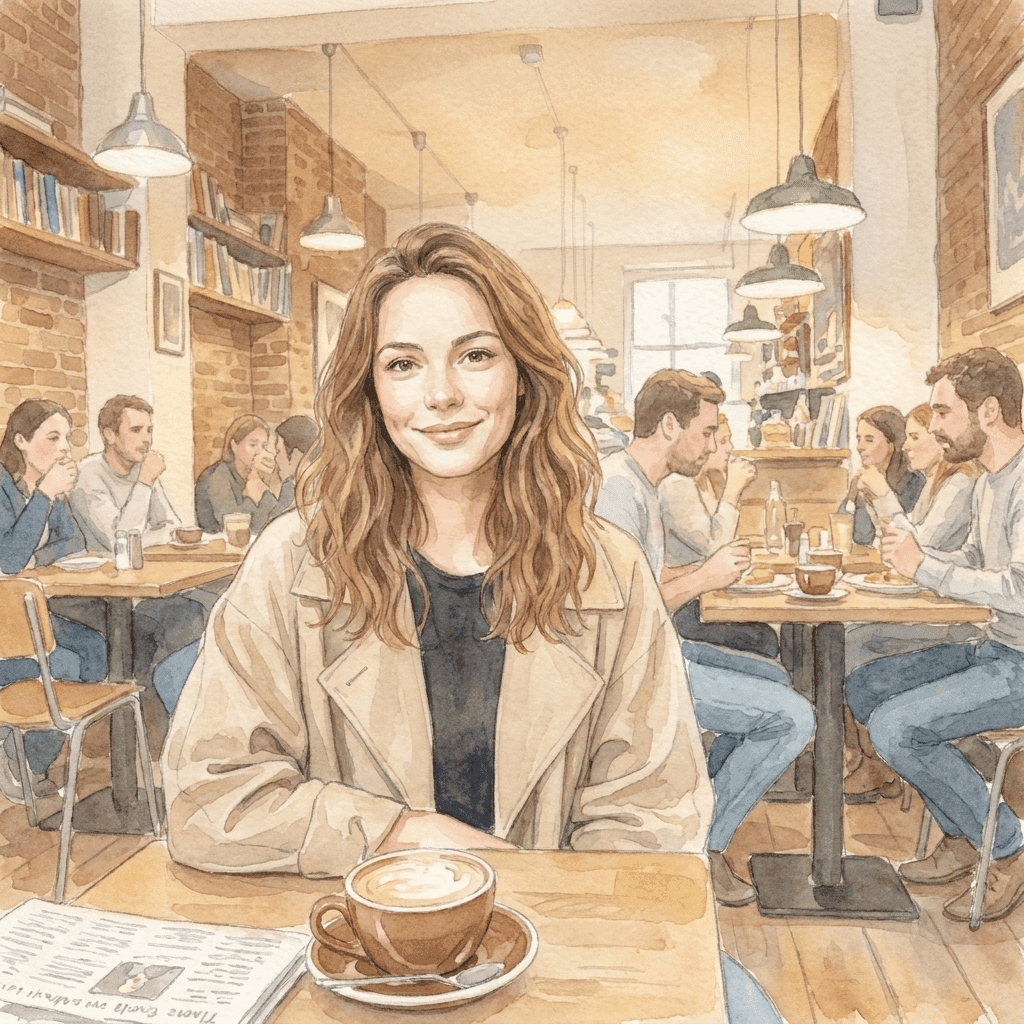
1 枚の写真から、やわらかな世界へ
この水彩イラストは、参考写真と短いスタイルの指示から生成しました。あなた自身のビジュアルの方向性を持ち込んで、画像が何に変われるかを探ってください。イラストがひと目で元の写真だとわかるのは、ポーズ、構図、光の落ち方が元の写真から来ているからです。指示が補う必要があったのは、画材だけでした。
画像から画像に集中したワークスペース
参考画像を持ち込み、方向性を選ぶだけ。
1 枚の参考画像から、たくさんのアイデア
1 枚の既存画像から、新しい場面、画材、ビジュアルスタイルを探れます。ファイルが上書きされることはないので、最初の答えがしっくりこなければ、同じ参考画像を別の方向性でいつでも実行し直せます。
モデルを選べる
PixJelly V2.0 か、利用できる外部の画像モデルのどれかを使えます。同じ参考画像と同じ指示でもモデルごとに読み取り方が違うので、あるモデルでうまくいかなかった方向性も、別のモデルで試す価値があることがよくあります。
すぐにダウンロード
結果はワークスペースから直接保存できます。間に透かしの手順も、別のエクスポート画面もありません。
フレームに合う形式
出力を 1:1、3:4、4:3、16:9、9:16 に設定できます。結果は後からトリミングされるのではなく、選んだ比率で生成されます。
思いを伝える余白
プロンプト欄には最大 5,000 文字まで入ります。変えたい点、残したいもの、求めるムードを、一度にまとめて書けます。
インストール不要
画像から画像の AI は、いまお使いのブラウザーで動きます。プラグインもデスクトップアプリも不要です。生成するには Google でログインしてください。初回ログイン時には 10 クレジットを無料で受け取れます。
ワークスペースにあるほかの道具
写真を変身させるのは仕事のひとつ。ほかの仕事はこちらで。
テキストから画像
参考画像が手元にないときは、プロンプトを書いて、言葉だけから画像を生成します。
注釈して編集
写真はそのままに、一部だけを変えます。その場所に矢印を引き、指示を書き添えます。
背景を削除
被写体を透過 PNG として切り抜きます。このツールはサーバーではなく、お使いの端末上で動きます。
画像づくりを続ける
画像から画像の AI が活きる場面
クリエイティブディレクション
- すでに気に入っている写真を、水彩画、インクドローイング、絵画風のイラストとして見てみる。
- 撮影し直さずに、画面全体に違うライティングを試す。
- ばらばらの参考画像を 1 つのビジュアル言語にそろえ、資料全体を 1 つのアイデアとして見せる。
商品画像
- 元の場面がキャンペーンに合わなくなったとき、商品写真の新しい背景を言葉で伝える。
- 実際の撮影を手配する前に、より暖かく、より冷たく、より雑誌的にと、違うムードを探る。
- 段落で説明して伝わることを祈る代わりに、その仕上がりがどう見えるかを実際に見せる。
スタイルの探索
- 同じ参考画像を 2 つのモデルで実行し、書いた方向性をどちらが理解したかを比べる。
- 指示を 1 か所ずつ変えて、何が動くかを観察する。モデルが実際に何を聞いているのかを知る、いちばんの近道です。
- 時間をかけて作った構図は残し、それ以外の要素はすべて変数として扱う。
個人の写真
- ポートレートを、カードやプロフィール画像、印刷して飾りたくなるイラストに変える。
- 旅行写真を、撮ったときとは違う季節の景色に描き直す。
- 古いスナップ写真に、飾りたい壁に合う仕上げを施す。
画像から画像の AI とは?
画像と、書かれた方向性がセットで入力されます。ほぼ理想に近いのに、スタイル、場面、ムードだけが違う写真を持っている人に向いています。返ってくる結果は、次の 4 つで決まります。
参考画像
25 MB までの PNG、JPEG、WebP を 1 枚。ワークスペースが長辺最大 1,800 ピクセルの作業用コピーを用意してモデルに送るので、それよりずっと大きなファイルを使っても得るものはありません。参考画像が運ぶのは、ポーズ、間の取り方、光の当たり方など、文章ではうまく説明しにくいすべてです。
方向性
何を変え、何を残すかを書いてください。ポーズ、レイアウト、商品の形など、残す価値のあるものを名指しするほうが、画面にすでに見えているものを説明するより、たいてい大切です。プロンプト欄には最大 5,000 文字まで入るので、指示書を縮める必要はありません。
モデル
PixJelly V2.0 は厳選したワークフローで、現在は Nano Banana Pro で動いています。Nano Banana 2.1、GPT Image 2、Seedream 5 Pro も選べ、同じ参考画像でもモデルごとに読み取り方が異なります。1 つの指示書を 2 つのモデルで試すのは手間が少なく、わかることは多いです。
結果
出力は選んだ比率で新しく生成された画像で、あなたのファイルに重ねた編集ではありません。参考画像は手つかずのまま残ります。結果パネルには一度に 1 枚しか表示されないので、残したいものは次を実行する前にダウンロードしてください。
レタッチではなく、新しい画像
画像から画像の AI は、画面全体を生成し直します。手が加わっていないように見える部分も含めて、結果のすべてはモデルが描いたものなので、文字、手、ロゴ、背景の小さなものが変わって返ってくることがあります。どこかで使う前に、参考画像と結果を見比べてください。
このトレードオフで、どのツールが合うかが決まります。スタイル、場面、ムードをまとめて変えたいなら、画像から画像の AI による変換が正解です。1 か所だけが違っていて写真の残りはすでに正しいなら、その場所を指し示して変更を書くほうが、元の写真をはるかに多く残せます。被写体を背景から切り離したいだけなら、端末上での切り抜きを使えば、元のピクセルにまったく手を加えずに済みます。
文章ではなく画像から始めることには、それがリスクになるのとまさに同じ理由で価値があります。参考画像は、どんな段落でも運べない情報をモデルに渡しますが、あなたが気にかけていなかった部分も一緒に渡します。だから、本当に欲しい構図に近い参考画像を選び、結果はスタイルだけでなく、ずれがないかという目でも確かめてください。
画像から画像の AI についての質問
参考画像は必要ですか?
はい。このツールはアップロードした 1 枚の画像から始めます。出発点になる画像がなければ、まず書いたプロンプトから画像を生成し、それを参考画像としてここに持ってきてください。
元のディテールはすべてそのまま残りますか?
いいえ。画面全体が生成し直されるので、文字、手、ロゴ、背景の小さなものが変わって返ってくることがあります。使う前に結果を確認し、1 か所だけが違う場合は、その部分だけを狙って直す編集を検討してください。
処理は端末上で行われますか?
いいえ。参考画像とプロンプトは選んだ画像プロバイダーに送られ、新しい画像はそのサーバーで生成されます。
参考画像はどれくらいのサイズがいいですか?
25 MB までの PNG、JPEG、WebP なら何でもかまいません。ワークスペースは長辺最大 1,800 ピクセルのコピーから生成するため、非常に大きな元画像を使っても、結果のディテールは増えません。
指示はどれくらい具体的に書けばいいですか?
変えたい点について具体的に、そして変更後も残したいものについても具体的に。残したいポーズ、レイアウト、商品の形を名指しするほうが、写真にはっきり見えているものを説明するより、たいてい役に立ちます。
結果はどのアスペクト比になりますか?
生成する前に選んだ比率です。1:1、3:4、4:3、16:9、9:16 から選べます。出力はトリミングではなく、その形で生成されるので、画像を使う場所に合う比率を選んでください。
元のファイルは変更されますか?
いいえ。結果は別の、新しく生成された画像です。参考画像は読み込んだときのまま残ります。結果パネルには一度に 1 枚しか表示されないので、残す価値のあるものは、もう一度実行する前にダウンロードしてください。
アカウントは必要ですか?
参考画像を読み込み、方向性を書くだけならアカウントは不要です。リクエストは画像プロバイダーのサーバーで実行されるため、生成には Google でのログインが必要です。初回ログイン時に追加される 10 クレジットで、最も安いモデルなら 2 枚生成できます。