
Imagem para imagem
Imagem de referência
IA de imagem para imagem: uma nova direção para a sua foto
Comece com uma foto de referência e descreva o que vem a seguir. Mude o estilo, o cenário ou o clima com o Imagem para imagem do PixJelly.
Da referência a uma nova interpretação
- 1
Adicione uma referência
Envie uma foto, solte no espaço de trabalho ou cole da área de transferência. São aceitos arquivos PNG, JPEG e WebP de até 25 MB, e o espaço de trabalho prepara uma cópia com até 1.800 pixels no lado maior antes de enviar qualquer coisa.
- 2
Descreva a sua direção
Diga o que mudar e o que manter. Escolha o PixJelly V2.0 ou um dos modelos de imagem externos e depois ajuste o formato do resultado ao quadro de que você realmente precisa.
- 3
Crie e salve
A solicitação roda nos servidores do provedor enquanto o espaço de trabalho acompanha a tarefa. Revise a imagem nova ao lado da referência e baixe para o seu próximo projeto, ou escreva outra direção e gere de novo.
Sua composição, com outro clima
Use uma foto como ponto de partida para uma nova direção visual. Descreva outro material, outra iluminação ou outro estilo artístico e mantenha os elementos que importam para você. Nomear o que vale manter importa tanto quanto nomear a mudança, porque cada pixel do quadro é desenhado de novo de qualquer forma.
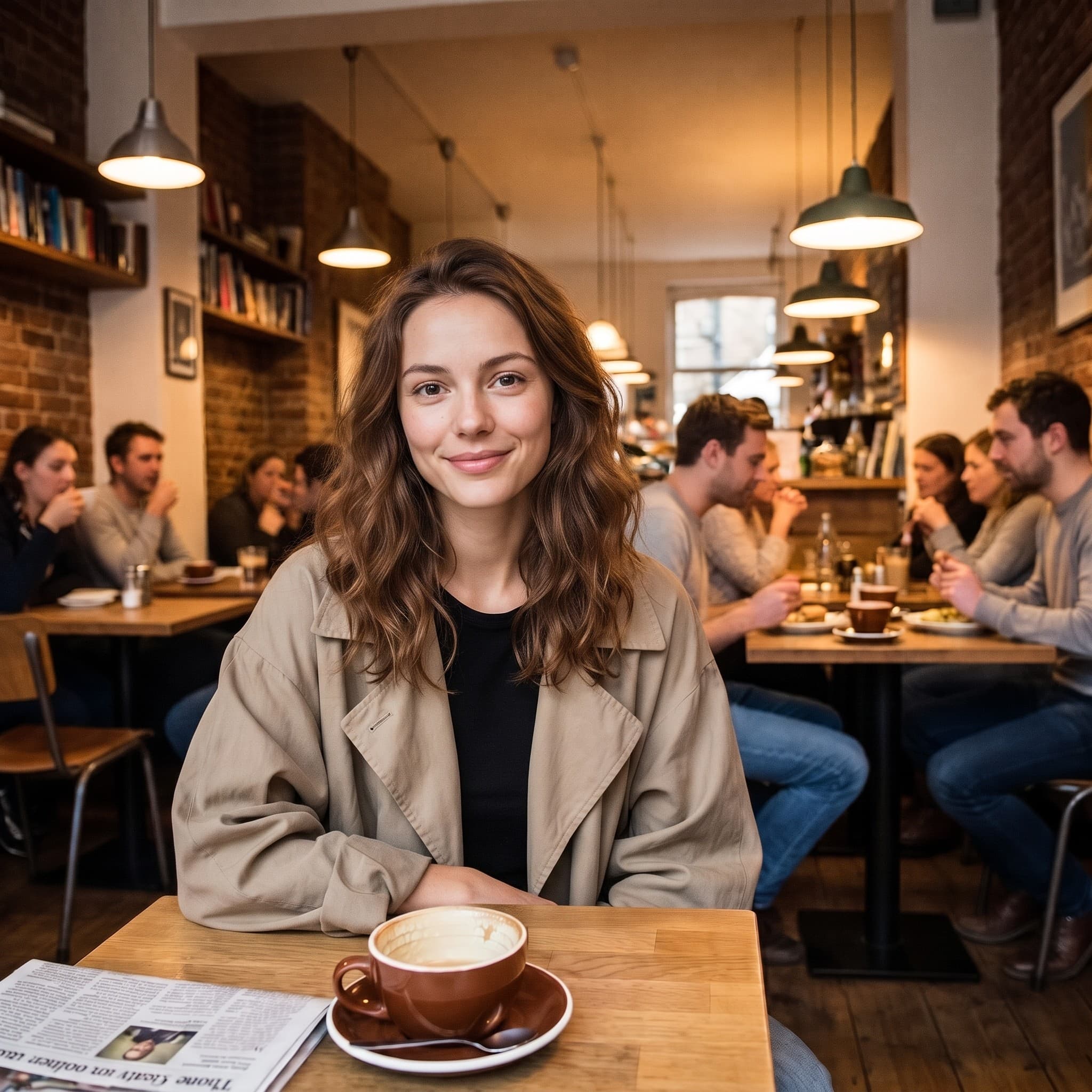
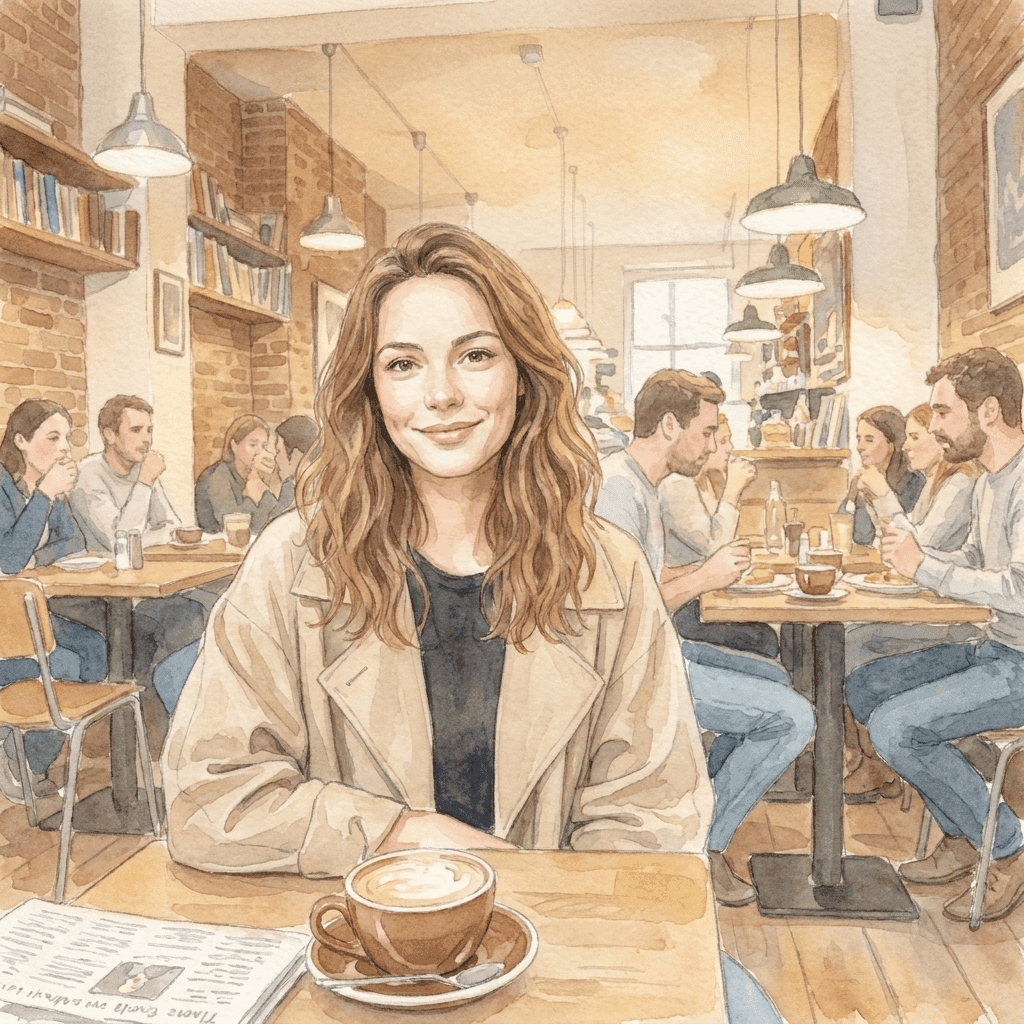
De uma foto para um mundo mais suave
Esta ilustração em aquarela foi gerada a partir da foto de referência com uma instrução curta de estilo. Traga a sua própria direção visual e descubra no que a sua imagem pode se transformar. A pose, o enquadramento e a forma como a luz cai no original são o que torna a ilustração reconhecível; a instrução só precisou indicar a técnica.
Um espaço de trabalho de imagem para imagem focado
Você traz a referência. Você escolhe a direção.
Uma referência, muitas ideias
Explore um novo cenário, técnica ou estilo visual a partir de uma única imagem existente. Seu arquivo nunca é sobrescrito, então você pode usar a mesma referência de novo com outra direção quando a primeira resposta não for a certa.
Escolha seu modelo
Use o PixJelly V2.0 ou um dos modelos de imagem externos disponíveis. Cada um lê a mesma referência e a mesma instrução de um jeito diferente, então uma direção que não funciona em um costuma valer a tentativa em outro.
Pronta para baixar
Salve o resultado direto do espaço de trabalho, sem etapa de marca d'água e sem tela de exportação separada no meio do caminho.
Formatos que se encaixam no quadro
Defina o resultado em 1:1, 3:4, 4:3, 16:9 ou 9:16. A imagem é gerada na proporção escolhida, e não recortada para ela depois.
Espaço para se explicar
A caixa de prompt aceita até 5.000 caracteres, o suficiente para descrever a mudança, o que deve ser preservado e o clima que você busca, tudo de uma vez.
Nada para instalar
A IA de imagem para imagem roda no navegador que você já tem. Sem plugin e sem aplicativo de desktop. Entre com o Google para gerar; seu primeiro login vem com 10 créditos grátis.
O que mais tem no espaço de trabalho
Transformar uma foto é um trabalho. Estes são os outros.
Texto para imagem
Não tem uma referência à mão? Escreva um prompt e gere uma imagem só com palavras.
Anotar e editar
Mantenha a foto como está e mude só uma parte dela. Desenhe uma seta até o ponto e escreva a instrução ali.
Remover fundo
Separe o objeto principal como PNG transparente. Essa ferramenta roda no seu próprio dispositivo, e não em um servidor.
Continue seu fluxo de imagem
Onde a IA de imagem para imagem se encaixa
Direção criativa
- Pegue uma fotografia de que você já gosta e veja como ela fica em aquarela, desenho a nanquim ou ilustração pintada.
- Teste outro tratamento de luz no quadro inteiro sem voltar para a sessão de fotos.
- Leve um conjunto de referências sem relação entre si para uma mesma linguagem visual, para que uma apresentação pareça uma única ideia.
Imagens de produto
- Descreva um novo fundo para uma foto de produto quando o cenário original não combina mais com a campanha.
- Explore outro clima, mais quente, mais frio ou mais editorial, antes de contratar a sessão que vai torná-lo real.
- Mostre a alguém como ficaria um tratamento em vez de descrevê-lo em um parágrafo e torcer para ser entendido.
Exploração de estilos
- Passe a mesma referência por dois modelos e compare qual entendeu a direção que você escreveu.
- Mude uma parte de cada vez e veja o que se mexe. É o jeito mais rápido de aprender a que um modelo realmente presta atenção.
- Mantenha a composição em que você já investiu tempo e trate todo o resto do quadro como variável.
Fotos pessoais
- Transforme um retrato em ilustração para um cartão, uma foto de perfil ou algo que valha a pena imprimir.
- Reimagine uma foto de viagem em uma estação do ano em que ela não foi tirada.
- Dê a uma foto antiga um tratamento que combine com a parede onde você quer pendurá-la.
O que é IA de imagem para imagem?
Uma imagem e uma direção escrita entram juntas. Serve para qualquer pessoa com uma foto quase certa, mas errada no estilo, no cenário ou no clima. Quatro coisas decidem o que volta.
Sua referência
Um PNG, JPEG ou WebP de até 25 MB. O espaço de trabalho prepara uma cópia com até 1.800 pixels no lado maior e envia essa cópia ao modelo, então um arquivo muito maior não traz ganho aqui. O que a referência carrega de fato é tudo o que um parágrafo tem dificuldade de descrever: a pose, os espaçamentos, o jeito como a luz cai.
Sua direção
Escreva o que deve mudar e o que deve ficar. Nomear o que vale manter (uma pose, um layout, o formato de um produto) costuma importar mais do que descrever o que já está visível no quadro. A caixa de prompt aceita até 5.000 caracteres, então não é preciso comprimir o pedido.
Seu modelo
O PixJelly V2.0 é nosso fluxo selecionado e hoje roda com o Nano Banana Pro. Nano Banana 2.1, GPT Image 2 e Seedream 5 Pro também estão disponíveis, e cada um lê a mesma referência de um jeito diferente. Testar um pedido em dois modelos custa pouco e diz muito.
Seu resultado
O resultado é uma imagem gerada de novo na proporção escolhida, e não uma edição aplicada sobre o seu arquivo. Sua referência fica intacta, e o painel de resultados guarda uma imagem por vez, então baixe o que quiser guardar antes da próxima geração.
Uma imagem nova, não um retoque
A IA de imagem para imagem regenera o quadro inteiro. Tudo no resultado foi desenhado pelo modelo, inclusive as partes que parecem intocadas, então letras, mãos, logotipos e objetos pequenos no fundo podem voltar diferentes. Compare o resultado com a sua referência antes de usá-lo em qualquer lugar.
Essa troca decide qual ferramenta faz sentido. Uma transformação de imagem para imagem é a escolha certa quando estilo, cenário e clima devem mudar juntos. Quando só uma área está errada e o resto da fotografia já está certo, apontar para essa área e descrever a mudança preserva muito mais do que você tinha. Quando você só precisa separar o objeto principal do fundo, um recorte no seu dispositivo deixa os pixels originais intactos.
Começar de uma imagem, e não de uma frase, vale a pena exatamente pelo mesmo motivo que torna isso arriscado. A referência entrega ao modelo informações que nenhum parágrafo consegue transmitir, e também entrega as partes em que você não estava pensando. Então escolha uma referência realmente próxima da composição que você quer e analise o resultado procurando desvios, não só o estilo.
Perguntas sobre IA de imagem para imagem
Preciso de uma imagem de referência?
Sim. Esta ferramenta começa de uma imagem enviada. Se você não tem de onde partir, gere primeiro uma imagem a partir de um prompt escrito e traga essa imagem para cá como referência.
Todos os detalhes do original vão continuar iguais?
Não. O quadro inteiro é gerado de novo, então textos, mãos, logotipos e objetos pequenos no fundo podem voltar diferentes. Revise o resultado antes de usar e considere uma edição local e pontual quando só uma área estiver errada.
Isso é processado no meu dispositivo?
Não. Sua referência e seu prompt são enviados ao provedor de imagens escolhido, e a imagem nova é gerada nos servidores dele.
Qual deve ser o tamanho da minha referência?
Qualquer PNG, JPEG ou WebP de até 25 MB. O espaço de trabalho gera a partir de uma cópia com até 1.800 pixels no lado maior, então um original muito grande não acrescenta detalhes ao resultado.
Quão específica deve ser a instrução?
Específica sobre a mudança e específica sobre o que deve sobreviver a ela. Nomear uma pose, um layout ou o formato de um produto que você quer manter costuma ser mais útil do que descrever o que já está claramente visível na fotografia.
Qual proporção o resultado vai usar?
A que você escolher antes de gerar: 1:1, 3:4, 4:3, 16:9 ou 9:16. O resultado é gerado nesse formato, e não recortado para ele, então escolha a proporção que combina com o lugar onde a imagem vai ficar.
Meu arquivo original é alterado?
Não. O resultado é uma imagem separada, gerada de novo. Sua referência fica exatamente como você adicionou, e o painel de resultados guarda uma imagem por vez, então baixe o que valer a pena antes de gerar de novo.
Preciso de uma conta?
Você pode adicionar uma referência e escrever uma direção sem conta. Para gerar é preciso entrar com o Google, porque a solicitação roda nos servidores de um provedor de imagens. Seu primeiro login adiciona 10 créditos grátis, o suficiente para duas imagens com o modelo de menor custo.