
Imagen a imagen
Imagen de referencia
IA de imagen a imagen: una nueva dirección para tu foto
Parte de una foto de referencia y describe lo que viene después. Cambia el estilo, el escenario o el ambiente con Imagen a imagen de PixJelly.
De la referencia a una interpretación nueva
- 1
Agrega una referencia
Sube una foto, suéltala en el espacio de trabajo o pégala desde el portapapeles. Se aceptan archivos PNG, JPEG y WebP de hasta 25 MB, y el espacio de trabajo prepara una copia de hasta 1800 píxeles en el lado largo antes de enviar nada.
- 2
Describe tu dirección
Cuéntanos qué cambiar y qué conservar. Elige PixJelly V2.0 o uno de los modelos de imagen externos y luego ajusta la forma del resultado al encuadre que realmente necesitas.
- 3
Crea y guarda
La solicitud se procesa en los servidores del proveedor mientras el espacio de trabajo sigue la tarea. Revisa la imagen nueva junto a tu referencia y descárgala para tu próximo proyecto, o escribe otra dirección y vuelve a generarla.
Tu composición, con otro ambiente
Usa una foto como punto de partida para una nueva dirección visual. Describe otro material, otra iluminación u otro estilo artístico y conserva los elementos que te importan. Nombrar lo que vale la pena conservar importa tanto como nombrar el cambio, porque cada píxel del encuadre se vuelve a dibujar de todos modos.
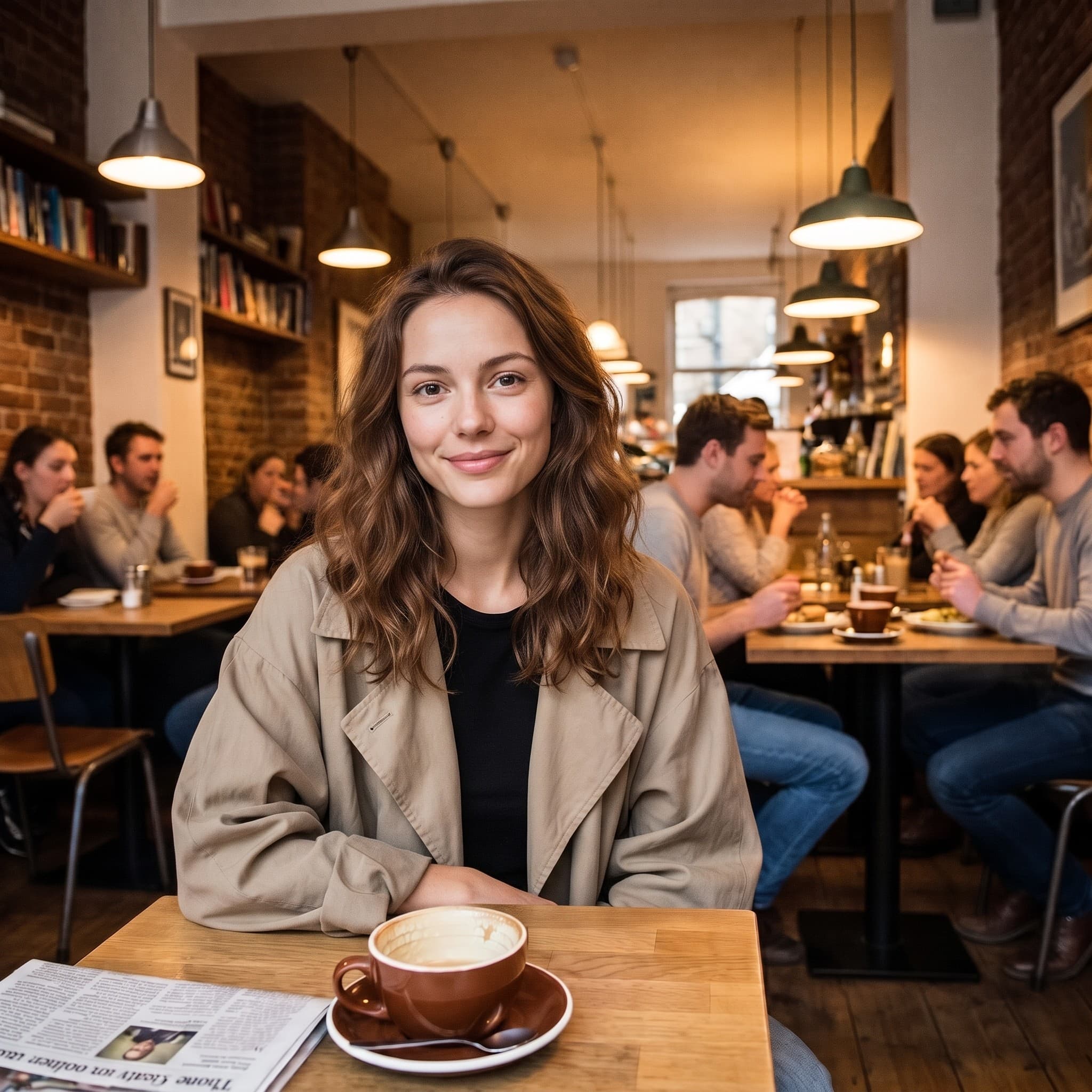
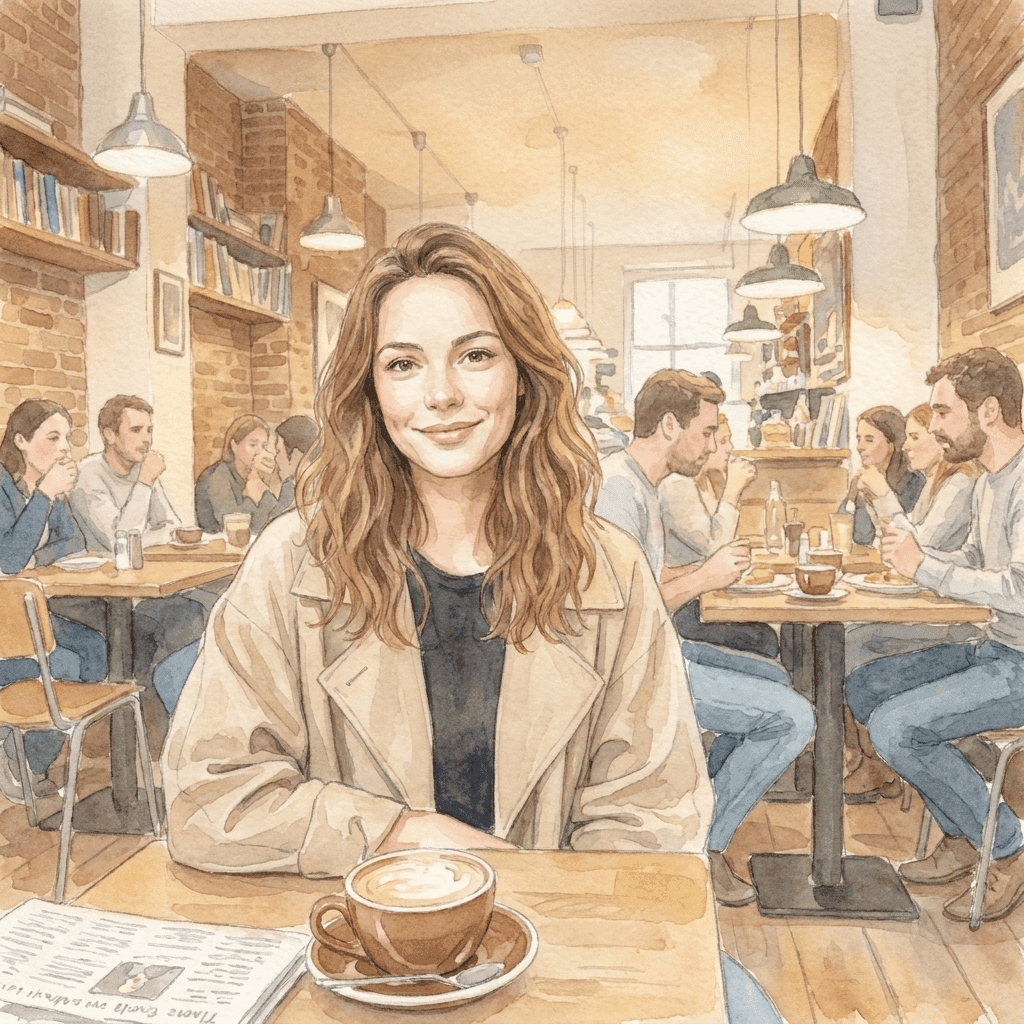
De una foto a un mundo más suave
Esta ilustración en acuarela se generó a partir de la foto de referencia con una breve instrucción de estilo. Trae tu propia dirección visual y descubre en qué puede convertirse tu imagen. La pose, el encuadre y la caída de la luz del original son lo que hace reconocible la ilustración; la instrucción solo tuvo que aportar la técnica.
Un espacio de trabajo de imagen a imagen enfocado
Tú traes la referencia. Tú eliges la dirección.
Una referencia, muchas ideas
Explora un escenario, una técnica o un estilo visual nuevos a partir de una sola imagen existente. Tu archivo nunca se sobrescribe, así que puedes volver a usar la misma referencia con otra dirección cuando la primera respuesta no sea la buena.
Elige tu modelo
Usa PixJelly V2.0 o uno de los modelos de imagen externos disponibles. Cada uno lee la misma referencia y la misma instrucción de forma distinta, así que una dirección que no funciona en uno suele valer la pena en otro.
Lista para descargar
Guarda el resultado directamente desde el espacio de trabajo, sin marca de agua que quitar ni pantalla de exportación aparte.
Formatos que se ajustan al encuadre
Ajusta el resultado a 1:1, 3:4, 4:3, 16:9 o 9:16. La imagen se genera en la proporción que elegiste, no se recorta a ella después.
Espacio para explicarte
El cuadro del prompt acepta hasta 5000 caracteres, suficiente para describir el cambio, lo que hay que conservar y el ambiente que buscas, todo de una vez.
Nada que instalar
La IA de imagen a imagen funciona en el navegador que ya tienes. Sin plugins y sin aplicación de escritorio. Inicia sesión con Google para generar; tu primer inicio de sesión incluye 10 créditos gratis.
Qué más hay en el espacio de trabajo
Transformar una foto es un trabajo. Estos son los demás.
Texto a imagen
¿No tienes una referencia a mano? Escribe un prompt y genera una imagen solo con palabras.
Anotar y editar
Deja la foto como está y cambia solo una parte. Dibuja una flecha hacia ese punto y escribe ahí la instrucción.
Quitar fondo
Separa el sujeto como PNG transparente. Esa herramienta funciona en tu propio dispositivo y no en un servidor.
Continúa tu flujo de imagen
Dónde encaja la IA de imagen a imagen
Dirección creativa
- Toma una fotografía que ya te gusta y mírala como acuarela, dibujo a tinta o ilustración pintada.
- Prueba otro tratamiento de luz en todo el encuadre sin volver a la sesión de fotos.
- Lleva un conjunto de referencias sin relación a un mismo lenguaje visual para que una presentación se lea como una sola idea.
Imágenes de producto
- Describe un fondo nuevo para una foto de producto cuando el escenario original ya no encaja con la campaña.
- Explora otro ambiente, más cálido, más frío o más editorial, antes de contratar la sesión que lo hará real.
- Muéstrale a alguien cómo se vería un tratamiento en lugar de describirlo en un párrafo y esperar que se entienda.
Exploración de estilos
- Pasa la misma referencia por dos modelos y compara cuál entendió la dirección que escribiste.
- Cambia una sola parte cada vez y observa qué se mueve. Es la forma más rápida de aprender a qué presta atención un modelo.
- Conserva la composición en la que ya invertiste tiempo y trata todo lo demás del encuadre como una variable.
Fotos personales
- Convierte un retrato en una ilustración para una tarjeta, una foto de perfil o algo que valga la pena imprimir.
- Reimagina una foto de vacaciones en una estación del año en la que no se tomó.
- Dale a una foto antigua un tratamiento que vaya con la pared donde quieres colgarla.
¿Qué es la IA de imagen a imagen?
Una imagen y una indicación escrita entran juntas. Le sirve a cualquiera que tenga una foto casi perfecta, pero equivocada en estilo, escenario o ambiente. Cuatro cosas deciden lo que vuelve.
Tu referencia
Un PNG, JPEG o WebP de hasta 25 MB. El espacio de trabajo prepara una copia de hasta 1800 píxeles en el lado largo y envía esa copia al modelo, así que un archivo mucho más grande no te aporta nada aquí. Lo que sí transmite la referencia es todo lo que a un párrafo le cuesta describir: la pose, las distancias, la forma en que cae la luz.
Tu dirección
Escribe qué debe cambiar y qué debe quedarse. Nombrar lo que vale la pena conservar (una pose, una disposición, la forma de un producto) suele importar más que describir lo que ya se ve en el encuadre. El cuadro del prompt admite hasta 5000 caracteres, así que no hace falta comprimir el encargo.
Tu modelo
PixJelly V2.0 es nuestro flujo seleccionado y actualmente funciona con Nano Banana Pro. También están disponibles Nano Banana 2.1, GPT Image 2 y Seedream 5 Pro, y cada uno lee la misma referencia de forma distinta. Probar un encargo con dos modelos cuesta poco y te dice mucho.
Tu resultado
El resultado es una imagen generada de nuevo en la proporción que elegiste, no una edición aplicada sobre tu archivo. Tu referencia queda intacta, y el panel de resultados guarda una imagen a la vez, así que descarga lo que quieras conservar antes de la siguiente generación.
Una imagen nueva, no un retoque
La IA de imagen a imagen regenera todo el encuadre. Todo lo que aparece en el resultado lo dibujó el modelo, incluidas las partes que parecen intactas, así que las letras, las manos, los logotipos y los objetos pequeños del fondo pueden volver cambiados. Compara el resultado con tu referencia antes de usarlo en cualquier sitio.
Ese intercambio decide qué herramienta conviene. Una transformación de imagen a imagen es la opción correcta cuando el estilo, el escenario y el ambiente deben cambiar juntos. Cuando solo una zona está mal y el resto de la fotografía ya es correcto, señalar esa zona y describir el cambio conserva mucho más de lo que tenías. Cuando solo necesitas separar el sujeto de su fondo, un recorte en tu dispositivo deja intactos los píxeles originales.
Partir de una imagen y no de una frase vale la pena justo por la misma razón por la que es arriesgado. La referencia le da al modelo información que ningún párrafo puede transmitir, y también le entrega las partes en las que no estabas pensando. Así que elige una referencia que de verdad se parezca a la composición que buscas, y revisa el resultado buscando desviaciones, no solo el estilo.
Preguntas sobre la IA de imagen a imagen
¿Necesito una imagen de referencia?
Sí. Esta herramienta parte de una imagen subida. Si no tienes de dónde partir, genera primero una imagen a partir de un prompt escrito y tráela aquí como referencia.
¿Se mantendrá igual cada detalle del original?
No. Todo el encuadre se genera de nuevo, así que el texto, las manos, los logotipos y los objetos pequeños del fondo pueden volver cambiados. Revisa el resultado antes de usarlo, y considera una edición local y puntual cuando solo una zona está mal.
¿Se procesa en mi dispositivo?
No. Tu referencia y tu prompt se envían al proveedor de imágenes que elegiste, y la imagen nueva se genera en sus servidores.
¿De qué tamaño debe ser mi referencia?
Cualquier PNG, JPEG o WebP de hasta 25 MB. El espacio de trabajo genera a partir de una copia de hasta 1800 píxeles en el lado largo, así que un original muy grande no añade detalle al resultado.
¿Qué tan concreta debe ser la instrucción?
Concreta sobre el cambio, y concreta sobre lo que debe sobrevivir a él. Nombrar una pose, una disposición o la forma de un producto que quieres conservar suele ser más útil que describir lo que ya se ve claramente en la fotografía.
¿Qué proporción tendrá el resultado?
La que elijas antes de generar: 1:1, 3:4, 4:3, 16:9 o 9:16. El resultado se genera con esa forma, no se recorta a ella, así que elige la proporción que corresponda al lugar donde irá la imagen.
¿Se modifica mi archivo original?
No. El resultado es una imagen aparte, generada de nuevo. Tu referencia queda exactamente como la agregaste, y el panel de resultados guarda una imagen a la vez, así que descarga lo que valga la pena antes de volver a generar.
¿Necesito una cuenta?
Puedes agregar una referencia y escribir una dirección sin cuenta. Para generar hace falta iniciar sesión con Google, porque la solicitud se procesa en los servidores de un proveedor de imágenes. Tu primer inicio de sesión suma 10 créditos gratis, suficientes para dos imágenes con el modelo de menor costo.