
Bild zu Bild
Referenzbild
Bild zu Bild mit KI: eine neue Richtung für Ihr Foto
Beginnen Sie mit einem Referenzfoto und beschreiben Sie, wie es weitergehen soll. Ändern Sie Stil, Umgebung oder Stimmung mit PixJelly Bild zu Bild.
Von der Referenz zu einer neuen Interpretation
- 1
Referenz hinzufügen
Laden Sie ein Foto hoch, ziehen Sie es in den Arbeitsbereich oder fügen Sie es aus der Zwischenablage ein. PNG-, JPEG- und WebP-Dateien bis 25 MB werden angenommen, und der Arbeitsbereich erstellt eine Arbeitskopie mit bis zu 1.800 Pixeln an der langen Kante, bevor irgendetwas gesendet wird.
- 2
Richtung beschreiben
Sagen Sie, was sich ändern und was bleiben soll. Wählen Sie PixJelly V2.0 oder eines der externen Bildmodelle und legen Sie dann die Form der Ausgabe passend zu dem Format fest, das Sie wirklich brauchen.
- 3
Erstellen und speichern
Die Anfrage läuft auf den Servern des Anbieters, während der Arbeitsbereich den Auftrag verfolgt. Prüfen Sie das neue Bild neben Ihrer Referenz und laden Sie es dann für Ihr nächstes Projekt herunter, oder schreiben Sie eine andere Richtung und starten Sie erneut.
Ihr Bildaufbau, eine andere Stimmung
Nutzen Sie ein Foto als Ausgangspunkt für eine neue visuelle Richtung. Beschreiben Sie ein anderes Material, ein anderes Licht oder einen künstlerischen Stil und behalten Sie die Elemente, die Ihnen wichtig sind. Zu benennen, was bleiben soll, ist genauso wichtig wie die Änderung selbst, denn jeder Pixel im Bild wird so oder so neu gezeichnet.
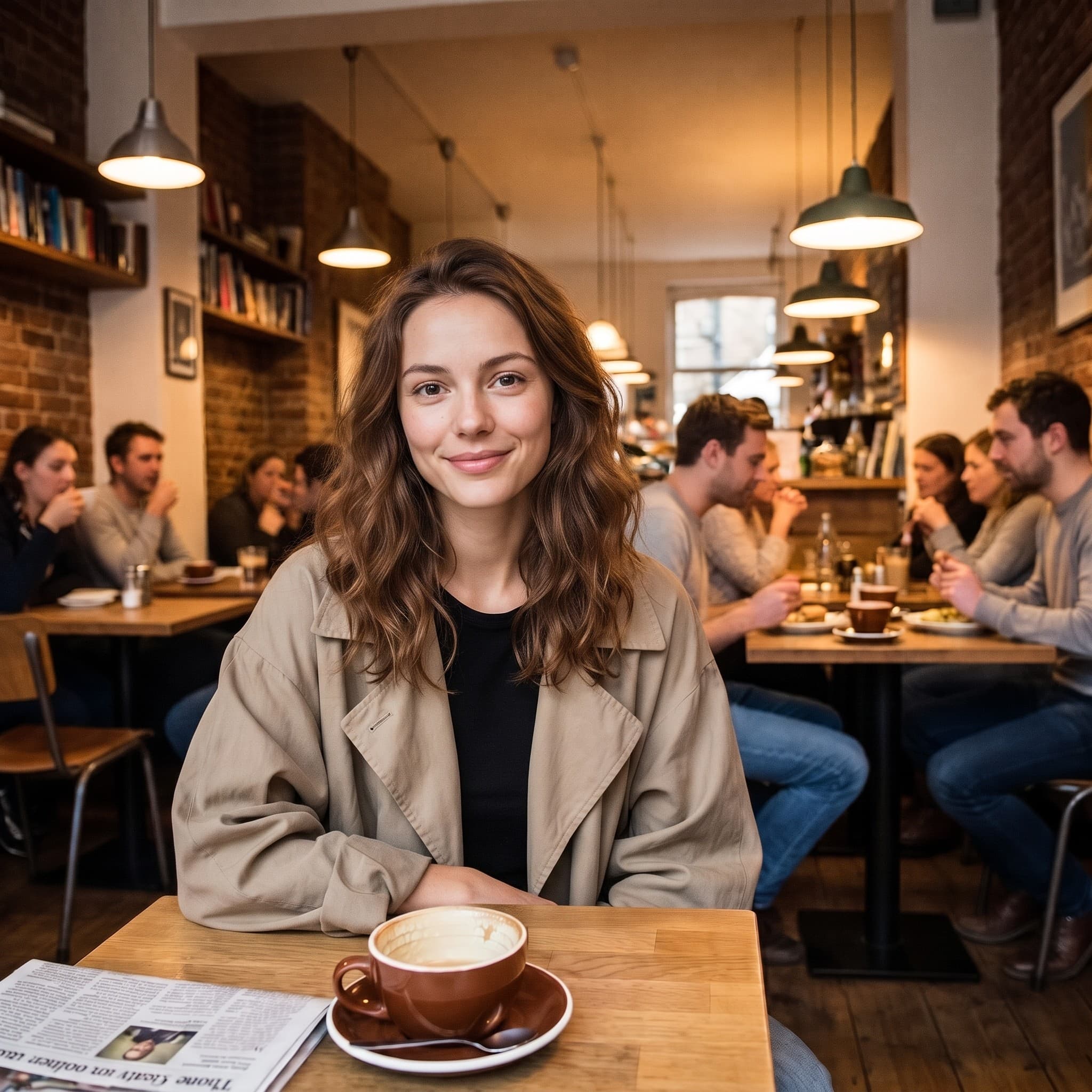
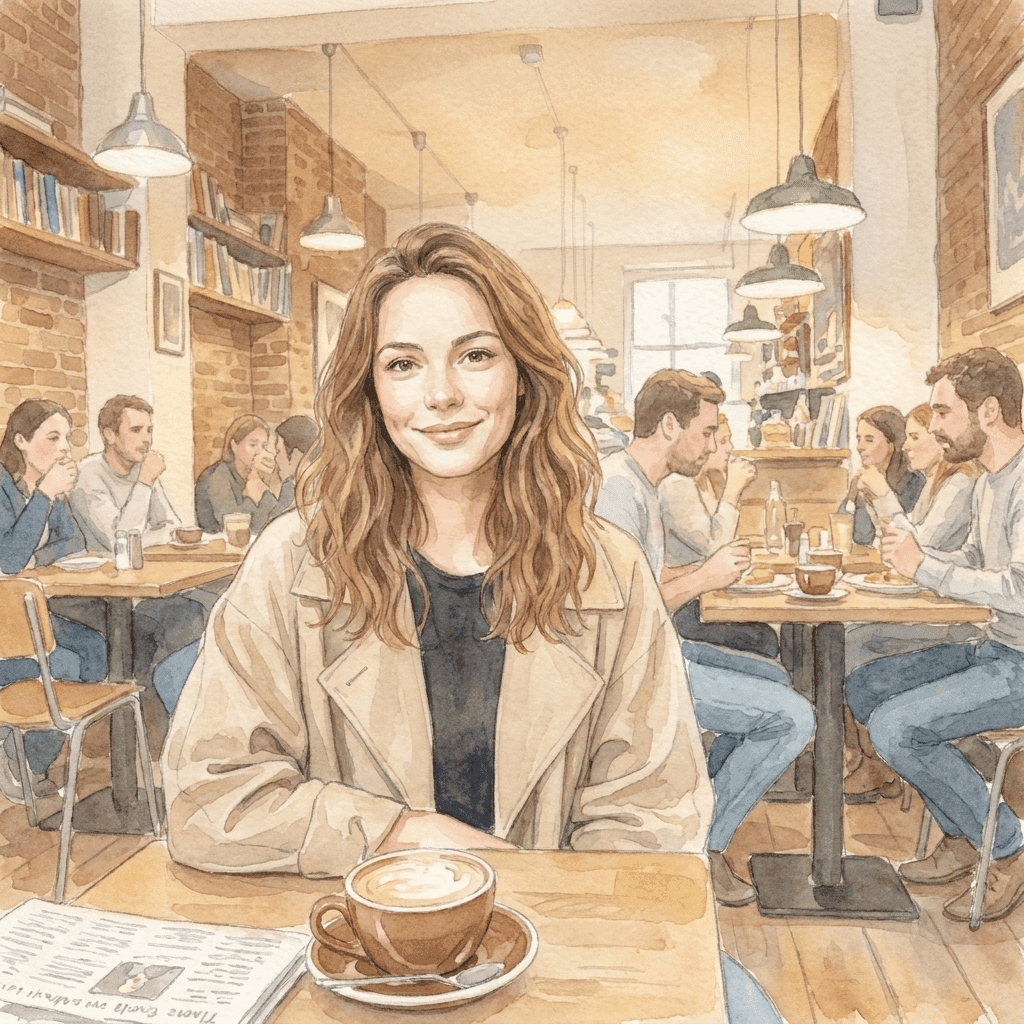
Vom Foto zu einer weicheren Welt
Diese Aquarell-Illustration entstand aus dem Referenzfoto mit einer kurzen Stilanweisung. Bringen Sie Ihre eigene visuelle Richtung mit und entdecken Sie, was aus Ihrem Bild werden kann. Pose, Bildausschnitt und Lichteinfall des Originals machen die Illustration wiedererkennbar; die Anweisung musste nur das Medium liefern.
Ein fokussierter Arbeitsbereich für Bild zu Bild
Sie bringen die Referenz. Sie wählen die Richtung.
Eine Referenz, viele Ideen
Erkunden Sie aus einem einzigen vorhandenen Bild eine neue Umgebung, ein neues Medium oder einen neuen visuellen Stil. Ihre Datei wird nie überschrieben, Sie können dieselbe Referenz also jederzeit mit einer anderen Richtung erneut verwenden, wenn die erste Antwort nicht die richtige war.
Ihr Modell wählen
Nutzen Sie PixJelly V2.0 oder eines der verfügbaren externen Bildmodelle. Jedes liest dieselbe Referenz und dieselbe Anweisung anders. Eine Richtung, die bei einem Modell ins Leere läuft, ist bei einem anderen oft einen Versuch wert.
Bereit zum Download
Speichern Sie Ihr Ergebnis direkt aus dem Arbeitsbereich, ohne Wasserzeichen-Schritt und ohne eigenen Exportbildschirm dazwischen.
Formate, die zum Bild passen
Stellen Sie die Ausgabe auf 1:1, 3:4, 4:3, 16:9 oder 9:16 ein. Das Ergebnis wird im gewählten Seitenverhältnis erzeugt, nicht nachträglich darauf zugeschnitten.
Platz für Erklärungen
Das Prompt-Feld nimmt bis zu 5.000 Zeichen auf. Das reicht, um die Änderung, die zu erhaltenden Dinge und die gewünschte Stimmung in einem Durchgang zu beschreiben.
Nichts zu installieren
Bild zu Bild mit KI läuft in dem Browser, den Sie bereits haben. Kein Plug-in und keine Desktop-Anwendung. Melden Sie sich mit Google an, um Bilder zu erzeugen; zur ersten Anmeldung gibt es 10 kostenlose Credits.
Was der Arbeitsbereich sonst noch kann
Ein Foto umzuwandeln ist eine Aufgabe. Das hier sind die anderen.
Text zu Bild
Keine Referenz zur Hand? Schreiben Sie einen Prompt und erzeugen Sie ein Bild allein aus Worten.
Bild markieren
Lassen Sie das Foto, wie es ist, und ändern Sie einen Teil davon. Zeichnen Sie einen Pfeil auf die Stelle und schreiben Sie die Anweisung dorthin.
Hintergrund entfernen
Stellen Sie das Motiv als transparentes PNG frei. Dieses Werkzeug läuft auf Ihrem eigenen Gerät statt auf einem Server.
Ihren Bild-Workflow fortsetzen
Wofür Bild zu Bild mit KI passt
Kreative Richtung
- Ein Foto, das Ihnen schon gefällt, als Aquarell, Tuschezeichnung oder gemalte Illustration sehen.
- Eine andere Lichtführung im ganzen Bild ausprobieren, ohne zum Shooting zurückzukehren.
- Mehrere voneinander unabhängige Referenzen in eine gemeinsame Bildsprache bringen, damit eine Präsentation wie eine einzige Idee wirkt.
Produktbilder
- Einen neuen Hintergrund für ein Produktfoto beschreiben, wenn die ursprüngliche Umgebung nicht mehr zur Kampagne passt.
- Eine andere Stimmung erkunden, wärmer, kühler oder redaktioneller, bevor Sie das Shooting buchen, das sie umsetzt.
- Jemandem zeigen, wie eine Bildbehandlung aussehen würde, statt sie in einem Absatz zu beschreiben und auf Verständnis zu hoffen.
Stile erkunden
- Dieselbe Referenz durch zwei Modelle laufen lassen und vergleichen, welches die geschriebene Richtung verstanden hat.
- Jeweils einen Satzteil ändern und beobachten, was sich bewegt. So lernen Sie am schnellsten, worauf ein Modell wirklich hört.
- Den Bildaufbau behalten, in den Sie schon Zeit gesteckt haben, und alles andere im Bild als Variable behandeln.
Persönliche Fotos
- Ein Porträt in eine Illustration für eine Karte, ein Profilbild oder etwas Druckwürdiges verwandeln.
- Ein Urlaubsfoto in einer Jahreszeit neu sehen, in der es nicht aufgenommen wurde.
- Einem alten Schnappschuss eine Bildbehandlung geben, die zu der Wand passt, an die er kommen soll.
Was ist Bild zu Bild mit KI?
Ein Bild und eine geschriebene Richtung gehen gemeinsam ein. Das passt für alle, die ein Foto haben, das fast stimmt, aber im Stil, in der Umgebung oder in der Stimmung danebenliegt. Vier Dinge entscheiden, was zurückkommt.
Ihre Referenz
Eine PNG-, JPEG- oder WebP-Datei bis 25 MB. Der Arbeitsbereich erstellt eine Arbeitskopie mit bis zu 1.800 Pixeln an der langen Kante und schickt diese Kopie an das Modell, eine viel größere Datei bringt hier also nichts. Was die Referenz aber mitbringt, ist alles, was sich in einem Absatz kaum beschreiben lässt: die Pose, die Abstände, wie das Licht fällt.
Ihre Richtung
Schreiben Sie, was sich ändern und was bleiben soll. Die Dinge zu benennen, die erhalten bleiben sollen (eine Pose, ein Layout, eine Produktform), ist meist wichtiger, als zu beschreiben, was ohnehin im Bild zu sehen ist. Das Prompt-Feld fasst bis zu 5.000 Zeichen, Sie müssen das Briefing also nicht verdichten.
Ihr Modell
PixJelly V2.0 ist unser kuratierter Workflow und läuft derzeit auf Nano Banana Pro. Nano Banana 2.1, GPT Image 2 und Seedream 5 Pro stehen ebenfalls zur Wahl, und jedes liest dieselbe Referenz anders. Ein Briefing an zwei Modellen auszuprobieren kostet wenig und verrät viel.
Ihr Ergebnis
Die Ausgabe ist ein neu erzeugtes Bild im gewählten Seitenverhältnis, keine Bearbeitung, die auf Ihre Datei gelegt wird. Ihre Referenz bleibt unberührt, und der Ergebnisbereich hält jeweils ein Bild. Laden Sie also alles herunter, was Sie behalten möchten, bevor Sie erneut starten.
Ein neues Bild, kein retuschiertes
Bild zu Bild mit KI erzeugt das ganze Bild neu. Alles im Ergebnis hat das Modell gezeichnet, auch die Teile, die unverändert aussehen. Schrift, Hände, Logos und kleine Objekte im Hintergrund können deshalb verändert zurückkommen. Vergleichen Sie das Ergebnis mit Ihrer Referenz, bevor Sie es irgendwo verwenden.
Dieser Kompromiss entscheidet, welches Werkzeug passt. Eine Umwandlung mit Bild zu Bild ist richtig, wenn sich Stil, Umgebung und Stimmung gemeinsam verschieben sollen. Wenn nur ein Bereich falsch ist und der Rest des Fotos bereits stimmt, bewahrt das Zeigen auf diesen Bereich mit einer Beschreibung der Änderung viel mehr von Ihrem Ausgangsbild. Und wenn Sie nur das Motiv vom Hintergrund lösen müssen, lässt ein Freisteller direkt auf dem Gerät die Originalpixel ganz in Ruhe.
Mit einem Bild statt mit einem Satz zu beginnen, lohnt sich genau aus dem Grund, aus dem es riskant ist. Die Referenz gibt dem Modell Informationen, die kein Absatz transportieren kann, und sie gibt ihm auch die Teile mit, an die Sie gar nicht gedacht haben. Wählen Sie deshalb eine Referenz, die dem gewünschten Bildaufbau wirklich nahekommt, und prüfen Sie das Ergebnis auf Abweichungen statt nur auf den Stil.
Fragen zu Bild zu Bild mit KI
Brauche ich ein Referenzbild?
Ja. Dieses Werkzeug beginnt mit einem hochgeladenen Bild. Wenn Sie nichts als Ausgangspunkt haben, erzeugen Sie zuerst ein Bild aus einem geschriebenen Prompt und bringen Sie es dann als Referenz hierher.
Bleibt jedes Detail des Originals gleich?
Nein. Das ganze Bild wird neu erzeugt, Text, Hände, Logos und kleine Objekte im Hintergrund können also verändert zurückkommen. Prüfen Sie das Ergebnis vor der Verwendung und greifen Sie lieber zu einer gezielten lokalen Bearbeitung, wenn nur ein Bereich falsch ist.
Wird das auf meinem Gerät verarbeitet?
Nein. Ihre Referenz und Ihr Prompt werden an den gewählten Bildanbieter gesendet, und das neue Bild entsteht auf dessen Servern.
Wie groß sollte meine Referenz sein?
Jede PNG-, JPEG- oder WebP-Datei bis 25 MB. Der Arbeitsbereich erzeugt aus einer Kopie mit bis zu 1.800 Pixeln an der langen Kante, ein sehr großes Original fügt dem Ergebnis also keine Details hinzu.
Wie genau sollte die Anweisung sein?
Genau bei der Änderung und genau bei dem, was sie überstehen soll. Eine Pose, ein Layout oder eine Produktform zu nennen, die erhalten bleiben soll, ist meist nützlicher, als zu beschreiben, was auf dem Foto ohnehin deutlich zu sehen ist.
Welches Seitenverhältnis hat das Ergebnis?
Das, das Sie vor dem Erzeugen wählen: 1:1, 3:4, 4:3, 16:9 oder 9:16. Die Ausgabe wird in dieser Form erzeugt und nicht darauf zugeschnitten. Wählen Sie also das Verhältnis, das zum Einsatzort des Bildes passt.
Wird meine Originaldatei verändert?
Nein. Das Ergebnis ist ein separates, neu erzeugtes Bild. Ihre Referenz bleibt genau so, wie Sie sie hinzugefügt haben, und der Ergebnisbereich hält jeweils ein Bild. Laden Sie also alles Behaltenswerte herunter, bevor Sie erneut starten.
Brauche ich ein Konto?
Eine Referenz hinzufügen und eine Richtung schreiben können Sie ohne Konto. Für das Erzeugen ist eine Google-Anmeldung nötig, weil die Anfrage auf den Servern eines Bildanbieters läuft. Zur ersten Anmeldung erhalten Sie 10 kostenlose Credits, genug für zwei Bilder mit dem günstigsten Modell.