
Image vers image
Image de référence
Image vers image par IA : une nouvelle direction pour votre photo
Partez d’une photo de référence et décrivez la suite. Changez le style, le décor ou l’ambiance avec Image vers image de PixJelly.
De la référence à une nouvelle interprétation
- 1
Ajoutez une référence
Importez une photo, déposez-la dans l’espace de travail ou collez-la depuis le presse-papiers. Les fichiers PNG, JPEG et WebP jusqu’à 25 Mo sont acceptés, et l’espace de travail prépare une copie de travail de 1 800 pixels au maximum sur le grand côté avant tout envoi.
- 2
Décrivez votre direction
Dites-nous ce qui doit changer et ce qui doit rester. Choisissez PixJelly V2.0 ou l’un des modèles d’image externes, puis réglez la forme du résultat pour qu’elle corresponde au cadre dont vous avez réellement besoin.
- 3
Créez et enregistrez
La demande s’exécute sur les serveurs du fournisseur pendant que l’espace de travail suit la tâche. Examinez la nouvelle image à côté de votre référence, puis téléchargez-la pour votre prochain projet, ou écrivez une autre direction et relancez.
Votre composition, une autre ambiance
Utilisez une photo comme point de départ d’une nouvelle direction visuelle. Décrivez une autre matière, une autre lumière ou un autre style artistique, tout en gardant les éléments qui comptent pour vous. Nommer ce qui mérite d’être gardé compte autant que nommer le changement, car chaque pixel de l’image est redessiné dans tous les cas.
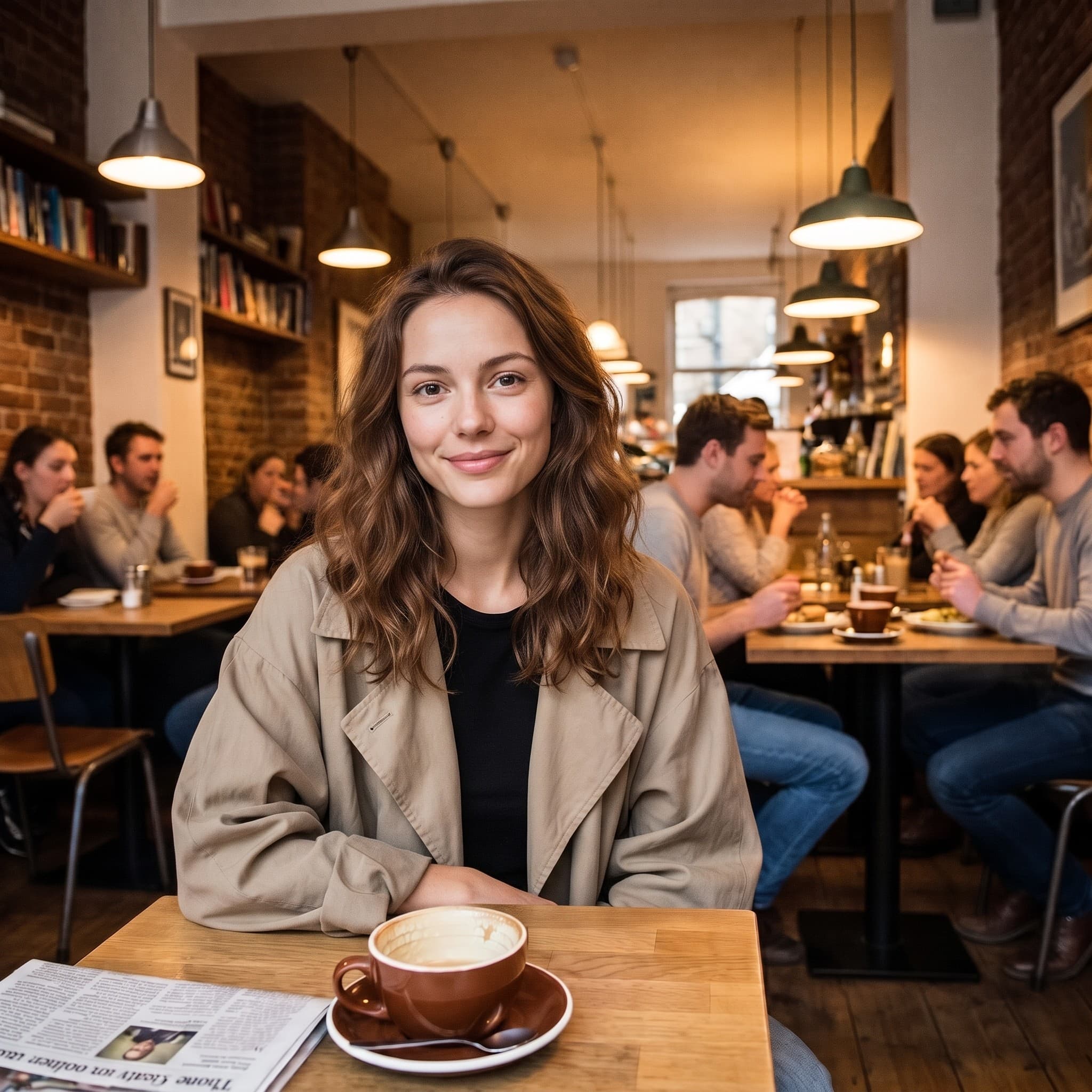
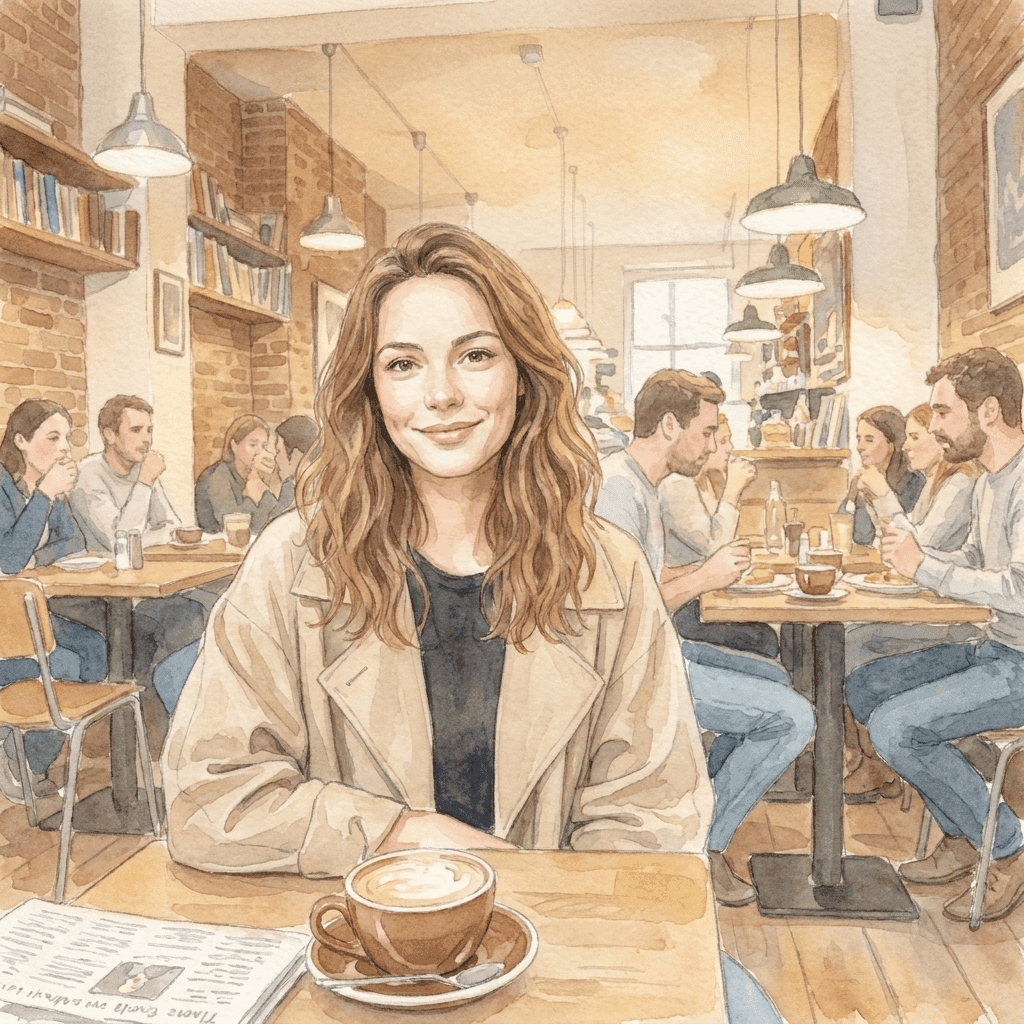
D’une photo à un monde plus doux
Cette illustration à l’aquarelle a été générée à partir de la photo de référence avec une courte instruction de style. Apportez votre propre direction visuelle et explorez ce que votre image peut devenir. La pose, le cadrage et la façon dont tombe la lumière dans l’original rendent l’illustration reconnaissable ; l’instruction n’avait qu’à fournir la technique.
Un espace image vers image qui va à l’essentiel
Apportez la référence. Choisissez la direction.
Une référence, de nombreuses idées
Explorez un nouveau décor, une nouvelle technique ou un nouveau style visuel à partir d’une seule image existante. Votre fichier n’est jamais écrasé : vous pouvez relancer la même référence avec une autre direction chaque fois que la première réponse n’est pas la bonne.
Choisissez votre modèle
Utilisez PixJelly V2.0 ou l’un des modèles d’image externes disponibles. Chacun lit différemment la même référence et la même instruction : une direction qui tombe à plat avec l’un vaut souvent la peine d’être essayée avec un autre.
Prêt à télécharger
Enregistrez votre résultat directement depuis l’espace de travail, sans étape de filigrane ni écran d’export séparé.
Des formats adaptés au cadre
Réglez le résultat en 1:1, 3:4, 4:3, 16:9 ou 9:16. L’image est générée au ratio choisi plutôt que recadrée après coup.
De la place pour vous expliquer
Le champ de prompt accepte jusqu’à 5 000 caractères, assez pour décrire le changement, ce qu’il faut préserver et l’ambiance recherchée, en une seule fois.
Rien à installer
L’image vers image par IA fonctionne dans le navigateur que vous avez déjà. Pas de plugin, pas d’application de bureau. Connectez-vous avec Google pour générer ; votre première connexion vous offre 10 crédits.
Ce que contient aussi l’espace de travail
Transformer une photo est un travail. Voici les autres.
Texte vers image
Pas de référence sous la main ? Écrivez un prompt et générez une image à partir des seuls mots.
Annoter et modifier
Gardez la photo telle quelle et changez-en une seule partie. Tracez une flèche vers l’endroit voulu, écrivez l’instruction à côté.
Supprimer l’arrière-plan
Détourez le sujet en PNG transparent. Cet outil fonctionne sur votre propre appareil plutôt que sur un serveur.
Poursuivez votre workflow d’image
Où l’image vers image par IA trouve sa place
Direction créative
- Prenez une photo que vous aimez déjà et voyez-la en aquarelle, en dessin à l’encre ou en illustration peinte.
- Essayez un autre traitement de la lumière sur toute l’image sans retourner en séance photo.
- Ramenez une série de références disparates à un même langage visuel, pour qu’une présentation se lise comme une seule idée.
Visuels produit
- Décrivez un nouveau fond pour une photo produit quand le décor d’origine ne correspond plus à la campagne.
- Explorez une autre ambiance, plus chaude, plus froide ou plus éditoriale, avant de réserver la séance qui la rendra réelle.
- Montrez à quelqu’un à quoi ressemblerait un traitement plutôt que de le décrire en un paragraphe en espérant être compris.
Exploration de styles
- Faites passer la même référence dans deux modèles et comparez lequel a compris la direction que vous avez écrite.
- Changez une proposition à la fois et observez ce qui bouge. C’est le moyen le plus rapide d’apprendre ce qu’un modèle écoute vraiment.
- Gardez la composition sur laquelle vous avez déjà passé du temps et traitez tout le reste de l’image comme une variable.
Photos personnelles
- Transformez un portrait en illustration pour une carte, une photo de profil ou quelque chose qui mérite d’être imprimé.
- Réimaginez une photo de vacances dans une saison où elle n’a pas été prise.
- Donnez à un vieux cliché un traitement qui convient au mur où vous voulez l’accrocher.
Qu’est-ce que l’image vers image par IA ?
Une image et une direction écrite partent ensemble. C’est fait pour quiconque a une photo presque juste, mais dont le style, le décor ou l’ambiance ne conviennent pas. Quatre éléments décident de ce qui revient.
Votre référence
Un fichier PNG, JPEG ou WebP jusqu’à 25 Mo. L’espace de travail prépare une copie de travail de 1 800 pixels au maximum sur le grand côté et envoie cette copie au modèle : un fichier beaucoup plus grand ne vous apporte donc rien ici. Ce que la référence transmet, en revanche, c’est tout ce qu’un paragraphe peine à décrire : la pose, les espacements, la façon dont tombe la lumière.
Votre direction
Écrivez ce qui doit changer et ce qui doit rester. Nommer ce qui mérite d’être gardé (une pose, une mise en page, la forme d’un produit) compte généralement plus que décrire ce qui est déjà visible dans l’image. Le champ de prompt contient jusqu’à 5 000 caractères, inutile donc de compresser le brief.
Votre modèle
PixJelly V2.0 est notre workflow sélectionné, qui s’appuie actuellement sur Nano Banana Pro. Nano Banana 2.1, GPT Image 2 et Seedream 5 Pro sont aussi disponibles, et chacun lit différemment la même référence. Essayer un même brief sur deux modèles coûte peu et vous en apprend beaucoup.
Votre résultat
Le résultat est une image nouvellement générée au ratio choisi, et non une retouche appliquée sur votre fichier. Votre référence reste intacte, et le panneau de résultat contient une image à la fois : téléchargez ce que vous voulez garder avant la prochaine exécution.
Une nouvelle image, pas une image retouchée
L’image vers image par IA régénère toute l’image. Tout ce qui figure dans le résultat a été dessiné par le modèle, y compris les parties qui semblent intactes : les textes, les mains, les logos et les petits objets d’arrière-plan peuvent donc revenir modifiés. Comparez le résultat à votre référence avant de l’utiliser où que ce soit.
Ce compromis décide de l’outil adapté. Une transformation image vers image est le bon choix quand le style, le décor et l’ambiance doivent changer ensemble. Quand une seule zone ne va pas et que le reste de la photo est déjà juste, désigner cette zone et décrire le changement préserve bien davantage de ce que vous aviez au départ. Et quand il suffit de séparer le sujet de son fond, un détourage sur l’appareil laisse les pixels d’origine entièrement intacts.
Partir d’une image plutôt que d’une phrase en vaut la peine, pour la raison même qui la rend risquée. La référence transmet au modèle des informations qu’aucun paragraphe ne peut porter, et elle lui transmet aussi les éléments auxquels vous ne pensiez pas. Choisissez donc une référence vraiment proche de la composition voulue, et lisez le résultat en cherchant les dérives, pas seulement le style.
Questions sur l’image vers image par IA
Ai-je besoin d’une image de référence ?
Oui. Cet outil part d’une image importée. Si vous n’avez rien pour commencer, générez d’abord une image à partir d’un prompt écrit et ramenez-la ici comme référence.
Chaque détail d’origine restera-t-il identique ?
Non. Toute l’image est générée à nouveau : les textes, les mains, les logos et les petits objets d’arrière-plan peuvent revenir modifiés. Vérifiez le résultat avant de l’utiliser, et envisagez plutôt une retouche locale ciblée quand une seule zone ne va pas.
Le traitement se fait-il sur mon appareil ?
Non. Votre référence et votre prompt sont envoyés au fournisseur d’images choisi, et la nouvelle image est générée sur ses serveurs.
Quelle taille doit faire ma référence ?
N’importe quel fichier PNG, JPEG ou WebP jusqu’à 25 Mo. L’espace de travail génère à partir d’une copie de 1 800 pixels au maximum sur le grand côté : un original très grand n’ajoute donc pas de détail au résultat.
À quel point l’instruction doit-elle être précise ?
Précise sur le changement, et précise sur ce qui doit y survivre. Nommer une pose, une mise en page ou la forme d’un produit à garder est généralement plus utile que décrire ce qui est déjà bien visible sur la photo.
Quel ratio le résultat utilisera-t-il ?
Celui que vous choisissez avant de générer : 1:1, 3:4, 4:3, 16:9 ou 9:16. Le résultat est généré dans cette forme plutôt que recadré, alors choisissez le ratio qui correspond à la destination de l’image.
Mon fichier d’origine est-il modifié ?
Non. Le résultat est une image distincte, nouvellement générée. Votre référence reste exactement telle que vous l’avez ajoutée, et le panneau de résultat contient une image à la fois : téléchargez ce qui mérite d’être gardé avant de relancer.
Ai-je besoin d’un compte ?
Vous pouvez ajouter une référence et écrire une direction sans compte. Générer demande une connexion Google, car la demande s’exécute sur les serveurs d’un fournisseur d’images. Votre première connexion ajoute 10 crédits offerts, de quoi créer deux images avec le modèle le moins coûteux.