
图片生成图片
参考图
AI 图生图:给你的照片一个新方向
从一张参考照片开始,写下接下来想要什么。用 PixJelly 图生图换风格、换场景、换氛围。
从参考图到全新的诠释
- 1
放入参考图
上传一张照片、拖进工作台,或者从剪贴板粘贴。支持 PNG、JPEG 和 WebP,最大 25 MB;发送之前,工作台会先准备一份长边最多 1,800 像素的工作副本。
- 2
写清你的方向
告诉我们要改什么、要留什么。选择 PixJelly V2.0 或某个外部图像模型,再把输出比例设成你真正需要的画幅。
- 3
生成并保存
请求在服务方的服务器上运行,工作台会跟进任务。把新图和参考图放在一起检查,然后下载用在下一个项目里,或者写一个不同的方向再跑一次。
同一个构图,另一种氛围
把一张照片当作新视觉方向的起点。描述另一种材质、光线或艺术风格,同时保住你在意的那些元素。点明哪些要保留,和点明要改什么同样重要,因为无论如何,画面里的每个像素都会被重新画一遍。
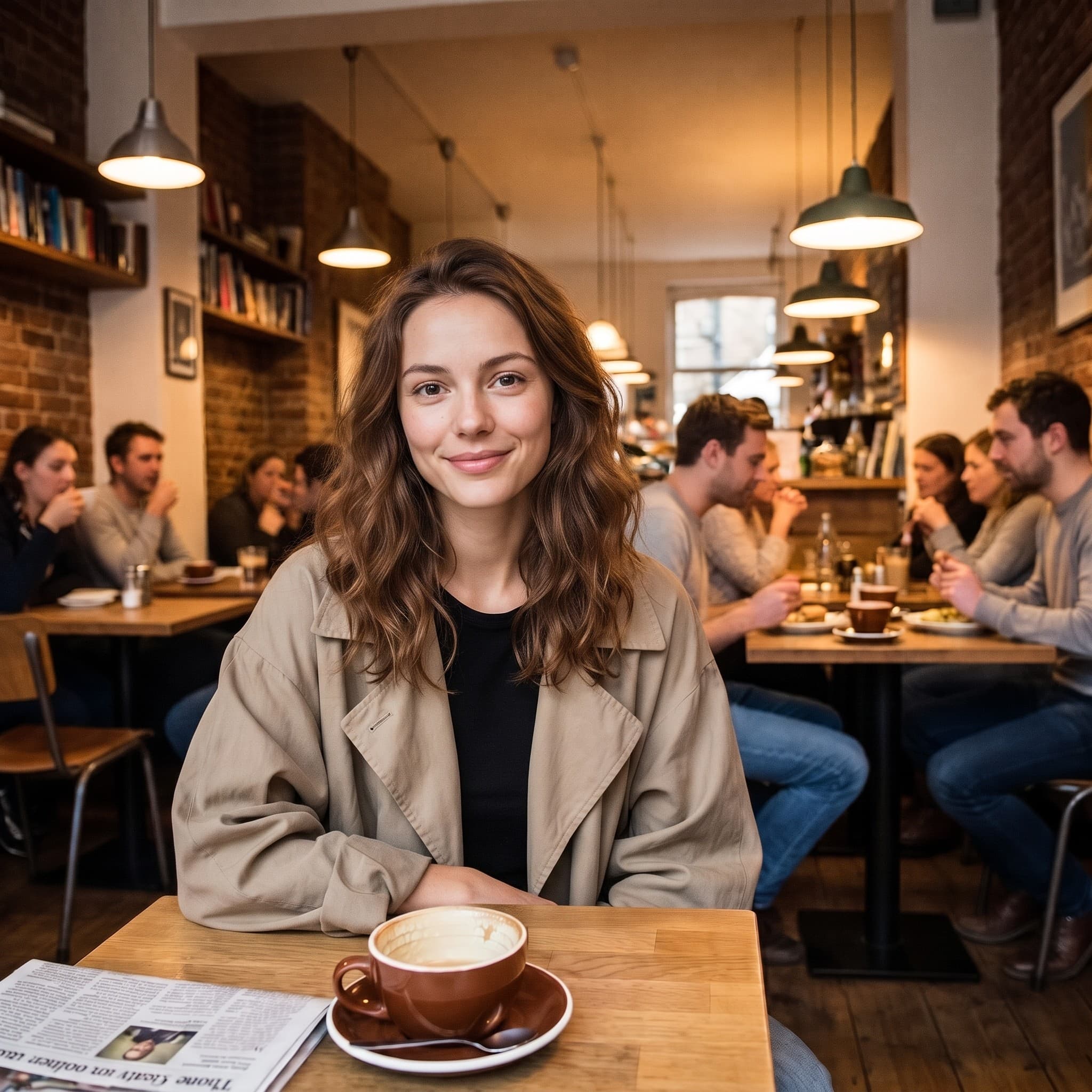
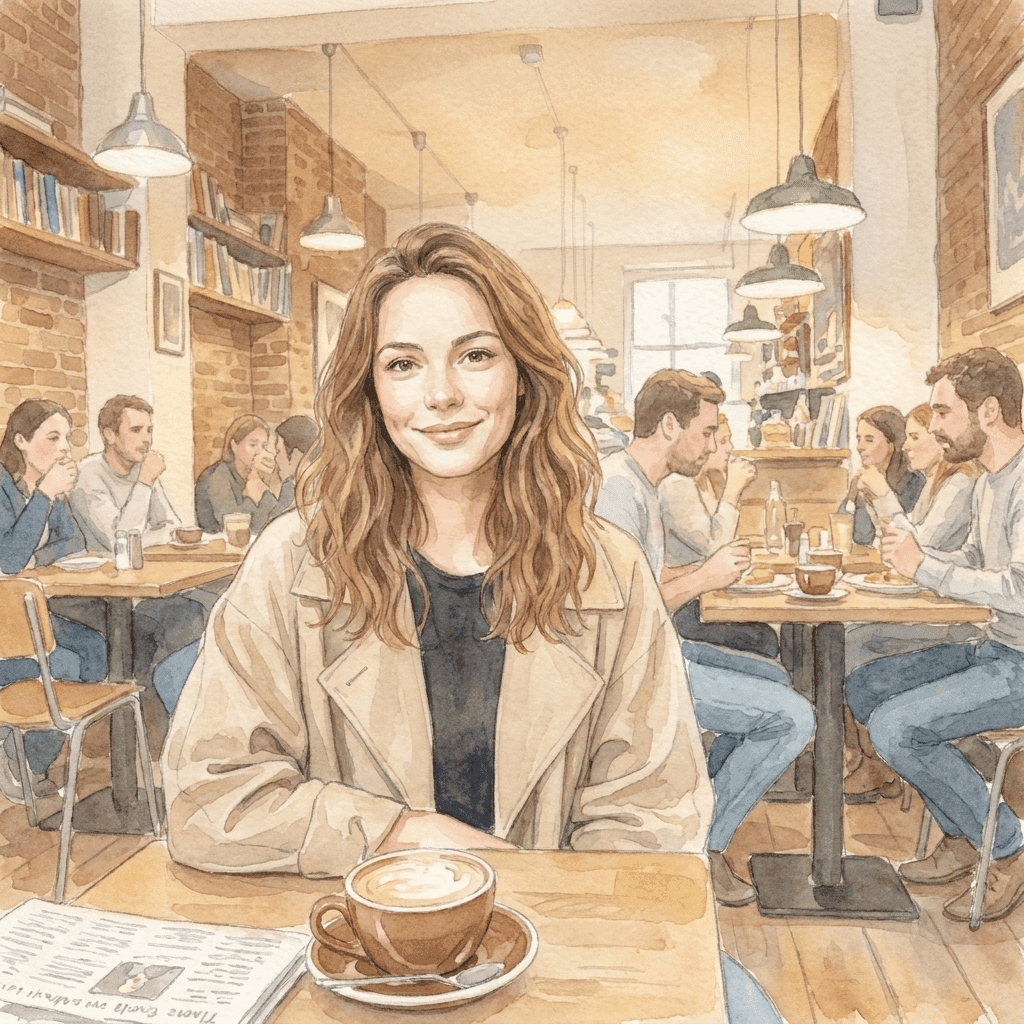
从一张照片,走进更柔和的世界
这幅水彩插画是用一句简短的风格指令,从参考照片生成出来的。带上你自己的视觉方向,看看你的图片能变成什么。让这幅插画一眼认得出来的,是原图里的姿势、取景和光线落下的方式;指令只需要补上“用什么画”。
一个专注的图生图工作台
你带来参考图,方向你来定。
一张参考,多种想法
从一张现有图片出发,探索新的场景、媒介或视觉风格。你的文件永远不会被覆盖,所以第一次的答案不对时,随时可以拿同一张参考图换个方向再跑。
模型自己选
使用 PixJelly V2.0,或任何一个可用的外部图像模型。每个模型对同一张参考图和同一条指令的理解都不一样,所以在一个模型上不出效果的方向,往往值得换一个模型试试。
随时可下载
直接在工作台里保存结果,中间没有加水印的步骤,也没有单独的导出页面。
比例贴合画幅
把输出设为 1:1、3:4、4:3、16:9 或 9:16。结果会直接按你选的比例生成,而不是事后裁成那个比例。
把话说清楚的空间
提示词框最多接受 5,000 个字符,足够一次写清要改什么、要保留什么,以及你想要的氛围。
无需安装
AI 图生图直接在你现有的浏览器里运行,不用插件,也不用桌面应用。用 Google 登录即可生成,首次登录赠送 10 积分。
工作台里还有什么
改造一张照片是一件事,下面是另外几件。
文字生成图片
手边没有参考图?写一段提示词,单凭文字生成一张图。
标注编辑
照片保持原样,只改其中一部分。在那个位置画一支箭头,把指令写在那里。
移除背景
把主体抠成透明 PNG。这个工具在你自己的设备上运行,而不是在服务器上。
继续你的图片流程
AI 图生图适合用在哪里
创意方向
- 拿一张你本来就喜欢的照片,看看它变成水彩、钢笔画或手绘插画是什么样子。
- 不用回去重拍,就能给整个画面试一种不同的光线处理。
- 把一组互不相关的参考图统一成同一种视觉语言,让整份提案读起来像一个完整的想法。
产品图
- 原来的场景已经不符合这次活动时,为产品图描述一个新的背景。
- 在预约真正的拍摄之前,先探索另一种氛围:更暖、更冷,或者更有杂志感。
- 直接给别人看某种处理方式的效果,而不是写一段话描述它,然后祈祷对方能领会。
风格探索
- 把同一张参考图交给两个模型,比较哪一个读懂了你写的方向。
- 一次只改一个分句,看看什么跟着变了。这是摸清模型到底听什么的最快办法。
- 保住你已经花时间调好的构图,把画面里其余的一切都当作变量。
个人照片
- 把一张人像变成插画,做贺卡、头像,或者值得打印出来的作品。
- 把一张度假照片重新想象成另一个季节,一个它拍摄时并不是的季节。
- 给一张老照片换一种处理方式,让它配得上你想挂它的那面墙。
什么是 AI 图生图?
一张图片和一段文字方向会一起送进去。手上有一张差不多对、但风格、场景或氛围不对的照片时,它最合适。决定结果的有四样东西。
你的参考图
一张 PNG、JPEG 或 WebP,最大 25 MB。工作台会准备一份长边最多 1,800 像素的工作副本并发送给模型,所以更大的文件在这里没有额外好处。参考图真正带来的,是一段文字很难描述的一切:姿势、间距、光线落下的方式。
你的方向
写下哪些该变、哪些该留。点明值得保留的东西(一个姿势、一种布局、一个产品造型),通常比描述画面里本来就看得到的东西更重要。提示词框最多容纳 5,000 个字符,不必压缩你的需求。
你的模型
PixJelly V2.0 是我们调校的工作流,目前运行在 Nano Banana Pro 上。也可以选 Nano Banana 2.1、GPT Image 2 和 Seedream 5 Pro,每个模型对同一张参考图的理解都不一样。同一份需求在两个模型上各试一次,花费不多,却能告诉你很多。
你的结果
输出是一张按你选定比例新生成的图片,而不是叠在你文件上的修改。参考图保持不变;结果面板一次只放一张图,所以想保留的图,在下一次运行前先下载。
一张新图,而不是修过的旧图
AI 图生图会重新生成整个画面。结果里的一切都是模型画出来的,包括看起来没动过的部分,所以文字、手、标志和背景里的小物件都可能变样。在任何地方使用结果之前,先和参考图对比一下。
这个取舍决定了该用哪个工具。当风格、场景和氛围需要一起改变时,AI 图生图是正确的选择。如果只有一个区域不对、照片其余部分都已经没问题,指着那个区域描述改动能保留多得多的原貌。如果你只需要把主体从背景里分离出来,在设备上完成的抠图完全不会动原有的像素。
从一张图片而不是一句话开始,值得的原因恰恰也是它的风险所在。参考图交给模型的信息,是任何一段文字都承载不了的;但它也会把你没在意的那些部分一并交过去。所以选一张真正接近你想要构图的参考图,检查结果时看它有没有走样,而不只是看风格。
AI 图生图常见问题
必须要有参考图吗?
是的。这个工具从一张上传的图片开始。如果手上什么都没有,可以先用文字提示生成一张图,再把它带回这里当作参考图。
原图的每个细节都会保持不变吗?
不会。整个画面会重新生成,所以文字、手、标志和背景里的小物件都可能变样。使用前先检查结果;如果只有一个区域不对,可以考虑改用定点的局部编辑。
是在我的设备上处理的吗?
不是。你的参考图和提示词会发送给所选的图像服务方,新图片在它的服务器上生成。
参考图应该多大?
任何 25 MB 以内的 PNG、JPEG 或 WebP 都可以。工作台会用长边最多 1,800 像素的副本来生成,所以原图再大,也不会给结果增加细节。
指令要写得多具体?
改动要写具体,要保留下来的东西也要写具体。点明你想保留的姿势、布局或产品造型,通常比描述照片里本来就一目了然的东西更有用。
结果会用什么比例?
就是你生成前选的那个:1:1、3:4、4:3、16:9 或 9:16。输出会直接按这个形状生成,而不是裁成这个形状,所以请选和图片去处相符的比例。
我的原文件会被修改吗?
不会。结果是一张单独的、新生成的图片。参考图保持你放进来时的样子;结果面板一次只放一张图,所以再次运行前,先把值得保留的图下载下来。
需要账号吗?
不登录也可以放入参考图、写下方向。生成需要用 Google 登录,因为请求在图像服务方的服务器上运行。首次登录赠送 10 积分,够用最低价的模型生成两张图。